Updating ontology
See also: The update run · Updating code · Updating data · Active ontology TLDs
The Dédalo ontology is the core of the application. It controls the data definition and how the data is interpreted. The ontology changes several times a day. Updating the ontology ensures that your Dédalo installation has the latest definition.
An exported ontology carries a version: the data version of the master that exported it (for example 7.0.0 in the ontology.json shipped under install/import/ontology/7.0/). The installation compares that version's data model with its own and refuses an ontology exported for another one. The export also records its date and host; they tell you when and where it was built, and they are never compared.
The ontology is built from different tlds. These tlds identify which part of the ontology is loaded and which parts will be updated.
Shared and private ontologies
In your installation you could have public and/or private tlds. Public tlds are common and shared definitions and are updated by the main developer/user community.
Private tlds are not common or shared ontology parts and are not maintained by the main developer/user community, but can be maintained by a specific institution or developer and shared by itself, or be your own definition.
Some examples of common and shared tlds: dd, rsc, oh, ich, tch, hierarchy, etc.
Some examples of private tlds: mupreva, qdp, muvaet, etc.
The update process replaces the whole ontology definition with the latest version, tld by tld; the automatic process reads your configuration and updates only the shared tlds.
Private tlds must be updated manually.
Common and shared tlds are defined by ACTIVE_ONTOLOGY_TLDS (set in ../private/.env). The installer writes it: the core ontologies, the domain ontologies chosen at install time and the ontologies they declare as dependencies (see Domain ontologies). See the Configuration Administrator Guide.
What the panel tells you
Under the master-server list, a collapsed note, Connect to a remote ontology server, shows
the ONTOLOGY_SERVERS entry that puts a master in the
list, field by field. When the picker is empty this is why, and the pill beside the title reads
None configured.
Whether THIS installation can serve its ontology to others is a separate maintenance panel,
Serve Ontology (see below). It reads the LIVE configuration, so it doubles as a check: each
../private/.env key is shown with its current state (CONFIGURED / NOT SET), never with its
value — the access code itself is never sent to the browser.
Serving other installations (ontology master)
If your installation is the one serving the ontology (IS_AN_ONTOLOGY_SERVER=true), each client's update panel asks it for the update manifest from the browser, not from the client's server. The master must therefore accept the client's origin in DEDALO_CORS_ALLOWED_ORIGINS or the client's browser blocks the call and the panel fails with a network error.
The minimum configuration for an installation that serves its ontology is three keys:
IS_AN_ONTOLOGY_SERVER=true
ONTOLOGY_SERVER_CODE=xx-myspecialcode-xxx
DEDALO_CORS_ALLOWED_ORIGINS=["*"]
IS_AN_ONTOLOGY_SERVER opens the ontology JSON
endpoint (and adds a Local files source to this installation's own panel);
ONTOLOGY_SERVER_CODE is the access code every
client must present — pick your own, and give it to the installations you authorize. The
endpoint clients register is <your origin>/dedalo/core/api/v1/json/, printed in the
Serve Ontology panel, which also shows the three keys as a live checklist.
Which value of DEDALO_CORS_ALLOWED_ORIGINS depends on who you serve:
- A known set of installations — list every client origin, as exact
scheme://host[:port]strings (no partial wildcards, no trailing slash):DEDALO_CORS_ALLOWED_ORIGINS=["https://archive.example.org","https://museum.example.org"]. - A public master, serving installations you do not know in advance — their origins cannot be enumerated, so set the single entry
*:DEDALO_CORS_ALLOWED_ORIGINS=["*"]. This opens only the anonymous API, the same surface anycurlon the internet already reaches; clients still present theONTOLOGY_SERVER_CODEaccess code, and no cross-origin caller ever carries a session.
Declaring what an ontology requires
A master also tells other installations what each ontology needs: the ontologies whose nodes it uses as models or links to, and the thesauri its data is meant to point at. An installer reads this declaration and nothing else. It never works out dependencies on its own.
The declaration is ordinary Dédalo data on the master:
- Open Ontology › Ontologies main (
ontology35) and edit the record of the ontology, for example thetchrecord. -
In the Relations group, fill Dependencies (
hierarchy60, a JSON field) with one object per requirement:[ { "tld": "dd", "main": "ontology35", "mandatory": true }, { "tld": "dc", "main": "hierarchy1", "mandatory": false } ]tldis the TLD of the requirement.mainsays what must be present.ontology35means that TLD's ontology.hierarchy1means that TLD's thesaurus (its hierarchy, with its terms, installed and active). A TLD may appear twice, once with each value.mandatory: trueon an ontology (ontology35) means it is always installed and cannot be unticked. On a thesaurus (hierarchy1) it is a strong recommendation: the installer offers it ticked and marked strongly recommended, and the operator may still untick it (a warning says it can be installed later) — a thesaurus never blocks an install. Withmandatory: false, the installer offers it already ticked and the operator may untick it.
Include the core ontologies the ontology uses (every domain ontology takes its models from
dd). An installer skips core ontologies, because every installation already has them. An ontology may name its own thesaurus (main: hierarchy1), but naming its own ontology is dropped. 3. Export the ontology files again (the Export action of the ontology parser). The export writes the list asdependencieson that ontology's entry inontology.json, and the update manifest serves it unchanged. Malformed items are left out and listed as export warnings.
An empty field means not declared, not needs nothing. The ontology is
exported with no dependencies, and an installer that is asked for it warns
that the server declares no dependencies, then installs it alone. An empty list
([]), or a list that names only core ontologies, is a complete declaration:
needs nothing beyond the core.
Importing keeps the declaration. When an installation imports an ontology whose master declares its requirements (with this panel or at install time), the import writes Dependencies on that ontology's record here, replacing what the field held. A master that gets its ontologies from another master (a local master for an institution's network, for example) therefore publishes the same declarations with its next export. An ontology the source does not declare leaves the field as it is.
An update reports what is missing; it never installs it. After an update,
each updated ontology's declared requirements are checked against this
installation. A missing mandatory requirement is listed under Import
warnings, naming both ontologies and how to provide it: add the TLD to
ACTIVE_ONTOLOGY_TLDS and run the update again, or install the thesaurus with
Maintenance › Install hierarchies. A missing optional requirement is only a note
in the import log.
On the client side
A client needs one key — the master it may pull from. The installer already
writes the official master here, unless the install was air-gapped
(--no-update-servers, or no to the installer's update-servers question),
which writes []. To use another master or a mirror, or to
switch an air-gapped install on, change the value on that existing line — replace
the [], or add the entry inside the list — then restart. An entry looks like this:
ONTOLOGY_SERVERS=[{"name":"Dédalo Ontology server","url":"https://myserverdomain.org/dedalo/core/api/v1/json/","code":"xx-myspecialcode-xxx"}]
code is the ONTOLOGY_SERVER_CODE configured on that server; a wrong or missing one makes
the master answer as Unreachable in the picker. Add one object per master.
A master is identified by its url, never by its code: several masters may share the same
access code (the official one and a local copy of it, for example), and the update downloads
only from the address of the master you picked. A file whose address is on any other host is
refused before it is written.
The client's own engine must also allow the connection: the browser's Content-Security-Policy has to name the master in connect-src, or the fetch is refused before it leaves. The engine derives this automatically from the master URLs in ONTOLOGY_SERVERS — there is no second setting — but the policy is built at boot, so a client that has just added or changed a master must be restarted before the panel can reach it.
The panel can report a master as ready and still fail on submit
The reachability check beside the button is made server to server, so neither CORS nor the CSP applies to it. Two separate browser-side gates can still refuse the update, and they fail with different messages in the browser console:
violates the following Content Security Policy directive: "connect-src …"— the client does not list the master. CheckONTOLOGY_SERVERSon the client, and restart it.- a CORS or network error naming the master — the master does not accept the client's origin. Check
DEDALO_CORS_ALLOWED_ORIGINSon the master.
Both surface in the panel as the same unhelpful Max retries reached, request failed, so read the console for these two.
A refusal that comes from the server — a download refused, a file that fails validation, an
import rolled back — is shown in the panel under the button: the error, the server's explanation
(for example origin mismatch: <file host> != <picked master>) and a request_id that finds the
same request in the server log.
Update process
The ontology is updated in two ways, both as update runs:
- With a code update. The
ontologyphase is part of a release's default steps, so a code update run updates the shared ontology after the code swap, from every configured source. You do nothing extra. - On its own, from this panel. Update Dédalo Ontology starts an ontology-only run: a run with one
ontologyphase, no code swap and no restart. It is journaled like any run: the superuser only, maintenance mode switched on for its duration and put back afterwards, the run's database backup (or the Update without a recent database backup waiver, recorded in the journal), the update lock, and resume on the next start if the server goes away mid-import. A failure ends inFAILED_PRE_SWAP: the code that runs is the code that ran.
In both cases the phase fails when no ontology source is configured (no ONTOLOGY_SERVERS entry and this installation is not an ontology master), or when any source fails.
To update the shared ontology on its own, enter into the Maintenance panel in the System administration -> Maintenance and locate the update ontology control:
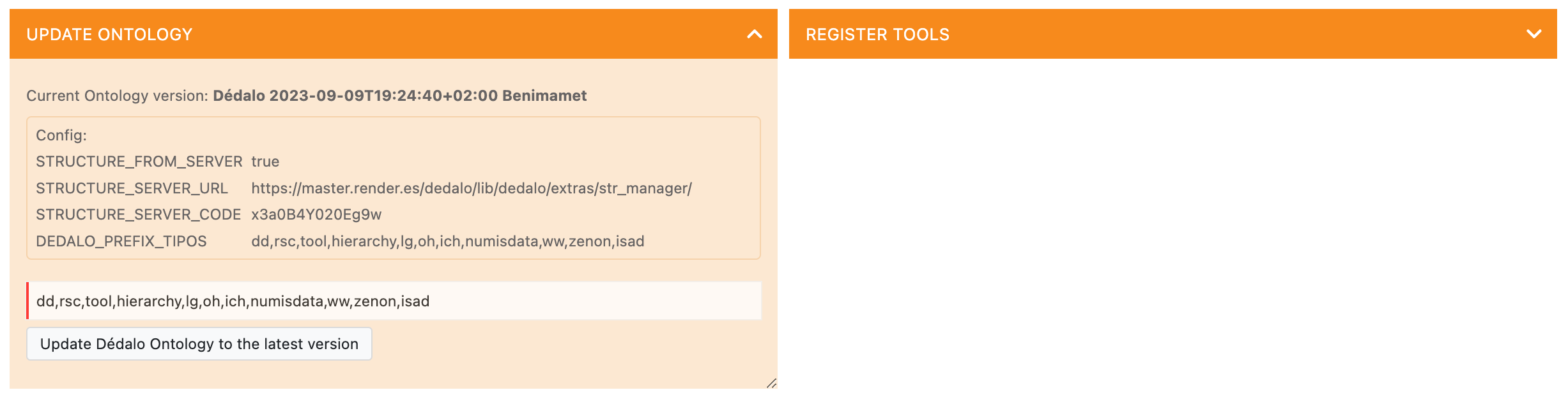
The control panel shows the ontology configuration and the tlds to be updated. The server decides the set itself: every tld of ACTIVE_ONTOLOGY_TLDS plus the core pair below, never the installation's own local ontology (localontology), that the source's manifest lists — and, with several masters, that the source's tlds list names — plus matrix_dd (the shared value lists). The tlds in the input field can only narrow that set; a tld outside it is never added, and matrix_dd is never narrowed away.
Database backup
An ontology update is refused without a recent, verified database backup (newer than DEDALO_BACKUP_TIME_RANGE hours, and proven restorable). The Database backup block above Replace selected ontologies tells you where you stand before you press it:
- A recent backup exists. The block shows its age in hours. There is nothing to decide.
- No recent, verified backup. The block says the update will be refused, and Replace selected ontologies stays disabled. Either make a backup in Backups and reload the panel, or tick Update without a recent database backup. With the box ticked the update runs without a restore point: if it goes wrong, the database cannot be restored from a backup. The waiver is recorded in the run's journal with your user.
- The newest backup is still being verified. Reading a large backup to prove it restorable takes time. Reload the panel in a moment.
Only the superuser's panel checks the backup. Only the superuser can run an update, so for any other administrator the block always reads as having no verified backup.
Which tlds are updated
The prefilled list is ACTIVE_ONTOLOGY_TLDS unioned with the core pair ontology / ontologytype (always imported, whatever the configuration says). When the key is not set in ../private/.env, it falls back to the core ontologies every installation carries — exactly what the install database ships:
dd, rsc, ontology, ontologytype, hierarchy, lg
Domain tlds (oh, ich, tch, numisdata, utoponymy, nexus, …) are per-installation: the installer writes the ones it installed into ACTIVE_ONTOLOGY_TLDS; add any you import later so they are offered here on every update — that is the only place to change the default for everybody. They are never part of the fallback above.
Adding a domain ontology later does not add its dependencies
The installer installs the dependencies an ontology server declares; this panel imports exactly the tlds in the line. When you add a domain ontology here, check the master's catalog (Fetch list) for what it requires and add those tlds too.
The panel tells you which of the two you are looking at: when the key is set the reference list is headed Configured in this installation, and when it is not it reads Engine fallback (not configured) and the note says so. An empty value counts as unset.
The master server you pick is also remembered in your browser (by URL) and restored the next
time the panel renders — after a reload or after navigating away and back — so the update is one
click when you come back to it. If that server later disappears from ONTOLOGY_SERVERS or is
unreachable, nothing is restored and you simply pick again.
The input line is yours. What you type there is remembered in your browser and is never rewritten when you select a master server, so you can prepare the list first and pick the server after. Two reference lists sit above it, and neither touches the input unless you click:
- Configured in this installation — the prefilled list above. Use this list puts it back, which is how you undo an edit.
- Offered by the selected master — the master's own manifest, fetched on demand with Fetch list (it costs one request, so it is not fetched just by selecting). It has no Use this list button on purpose: a master publishes the whole ontology, 200+ tlds including every language pack, and importing all of it is never what you mean.
Clicking any tld chip adds it to the line, or removes it if it is already there. A chip is highlighted while its tld is in the line, in both lists — including when you type in the field by hand — so the reference lists double as a readout of what the update will import.
When ready, press the "Update Dédalo Ontology to the latest version" button, and the process will execute.
Dédalo will erase all definitions of the specified tlds and import the new definition.
Before anything is downloaded, the server reads the master's ontology list itself; the browser only says which tlds to update. The update is refused, with a message naming the reason, when:
- the master's ontology was exported for a data model this installation is not on. A master on a newer line needs a code update here first.
- this installation's database is not yet on the data model of its code. Run "Update data" first.
- the master does not list a requested tld.
- several ontology masters are configured and a tld is not assigned to exactly one of them (below).
Several ontology masters. When ONTOLOGY_SERVERS lists more than one master, each entry names the tlds this installation takes from it in a tlds list (put matrix_dd, the shared value lists, in exactly one). A tld that no master lists, or that two masters list, is refused, and so is a tld requested from a master that does not list it. With a single master no tlds list is needed. Masters must be reached over https://.
Every file is checked against the master's digest. When a master exports its ontologies it records the sha256 of each exported file (<tld>.copy.gz, matrix_dd.copy.gz) in its ontology.json, under files_sha256. Each file this installation downloads, or copies from its own export directory, must match that digest before it is decompressed: a file that does not match is deleted and the update stops with Ontology file does not match the master manifest. A master that has not re-exported since digests were introduced publishes none. An update run (Update ontology, or the ontology phase of a code update) refuses such a source and names the files with no digest. Re-export on the master to publish digests.
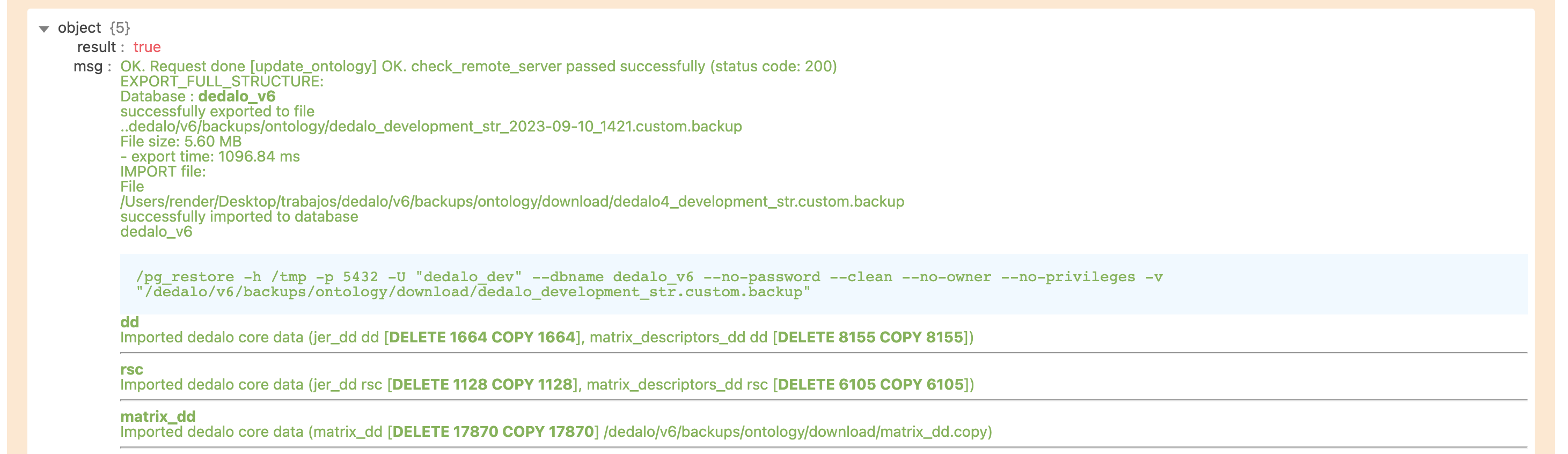
The import pipeline (update_ontology widget, src/core/ontology/ontology_update.ts) stages and validates every downloaded file before making any destructive change, then takes a recovery snapshot of the ontology records of every tld it will replace. If the import fails partway through, the records of every tld already replaced are put back from those snapshots, including a tld that had no records before the update, which is left empty again.
That restore is not a full rollback, and the result message says so:
- Before importing a tld's records, the update creates or refreshes that tld's entry in the ontology registry and its root node in the active ontology. The snapshots do not cover these, so a failed import leaves them in place. The message then reads matrix rows restored; registry and dd_ontology state may be partial, and an error line names the tlds to review.
- If a snapshot is missing or cannot be put back, the message says the restore is INCOMPLETE, and an error line names the snapshot file to restore by hand.
- Only when neither applies does the message say previous state restored.
Once every tld's records have been imported, the update counts as done. A later step that fails is reported as an error line, and the imported records are not rolled back.
A schema-changes snapshot of the update is written under ../private/backups/ontology/changes/.
What the update will remove (census). Before replacing anything, the update compares each tld's current definitions with the new package and reports, for each tld where it finds something:
- the nodes the package no longer contains, and
- the nodes whose model changes (for example a
component_input_textthat becomes acomponent_text_area).
When one of those nodes is a section, the report also counts the records stored in that section. Each such tld gets one line in the import log, and the full list comes back in the response as census. The census only reports. It never stops the update: decide from it whether the records under a removed section need attention.
Updating without a network (air-gapped installs)
Copying ontology files onto the server imports nothing by itself: every import
goes through this panel. An installation that can reach no master (an
air-gapped install has ONTOLOGY_SERVERS=[]) imports from its own disk through
the panel's Local files source:
- Get the files from a master's export: for each tld a
<tld>.copy.gz, plus theontology.jsonthat describes them (andmatrix_dd.copy.gzfor the private lists). They come in a version directory,<major.minor>/, for example7.0/. - Put that directory under the server's ontology I/O directory,
ONTOLOGY_DATA_IO_DIR— by default../private/import/ontology/. Never the in-treeinstall/import/ontology/: it holds the release that ships with the code, and a code update moves the whole code tree aside, files you added included. - Set
IS_AN_ONTOLOGY_SERVER=truein../private/.envand restart. That is what adds Local files to the panel. It also makes this installation serve the files in that directory to anyone who can reach it; set it back tofalseand restart after the import if you do not mean to serve. - In the panel, pick Local files, put the tlds in the line, and update.
The files themselves are copied from that directory on disk; nothing is
downloaded. Only the file list (the manifest) is fetched over the network: your
browser asks this installation's own public address for it, so the server must
know that address (DEDALO_HOST); with
it unset, only a browser on the server itself gets the list.