The AI Assistant
See also: RAG & semantic search · Publication API v2 — MCP · Tools catalog · Ontology · Glossary
The AI Assistant is a chat panel inside the Dédalo work application that lets a cataloguer, researcher or archivist talk to their catalogue in natural language: "find every interview about the reservoir", "what is in this record?", "create a person named Anna Pujol and link her to this testimony". It searches, reads, explains and — when you allow it — proposes edits, always through the same permissions and the same engine as the human using it.
This section is written for two readers:
- Operators and administrators — who install, connect a model, configure and secure the assistant for a real institution. Start at Installing & enabling.
- Integrators and developers — who want to drive the assistant from their own code or understand its wire protocol. Jump to the Cookbook.
If you read only one paragraph: the assistant is a thin chat client over a server-side agent. The model, the tools, the prompt, the audit trail and the privacy controls all live on the Dédalo server. The browser sends a question and renders the streamed answer; it never runs a model and never holds an API key. This is what makes the assistant safe to point at a real archive — including archives whose data may never leave the building.
What it can do
- Find by meaning, not just by string. Ask for "displacement caused by a dam" and it can reach the testimony that says "when the water came and we had to leave", using the semantic-search layer.
- Navigate the ontology safely. It resolves human names to the internal
tipoidentifiers before acting, so it never guesses which section or field you meant. - Read and explain records in your language, citing each record so you can open it.
- Propose changes for your confirmation (when write mode is enabled): it never writes on its own — it drafts a change plan that you review, op by op, and confirm before anything is saved.
- See images (with a vision-capable model): attach an object photograph or a document scan and ask it to describe or transcribe.
What it is not
- It is not a second way into your data. It sees exactly what its user could see through the normal client — the same project scope, the same record-level permissions. An assistant answer can never contain a record the person wasn't already allowed to open.
- It is not an autonomous editor. In write mode it proposes; a human applies. The loop that talks to the model is structurally incapable of writing.
- It is not the Publication API's MCP server. That serves published (diffusion) data to the outside world. This assistant works inside the private editing application, on live work data.
Architecture in one picture
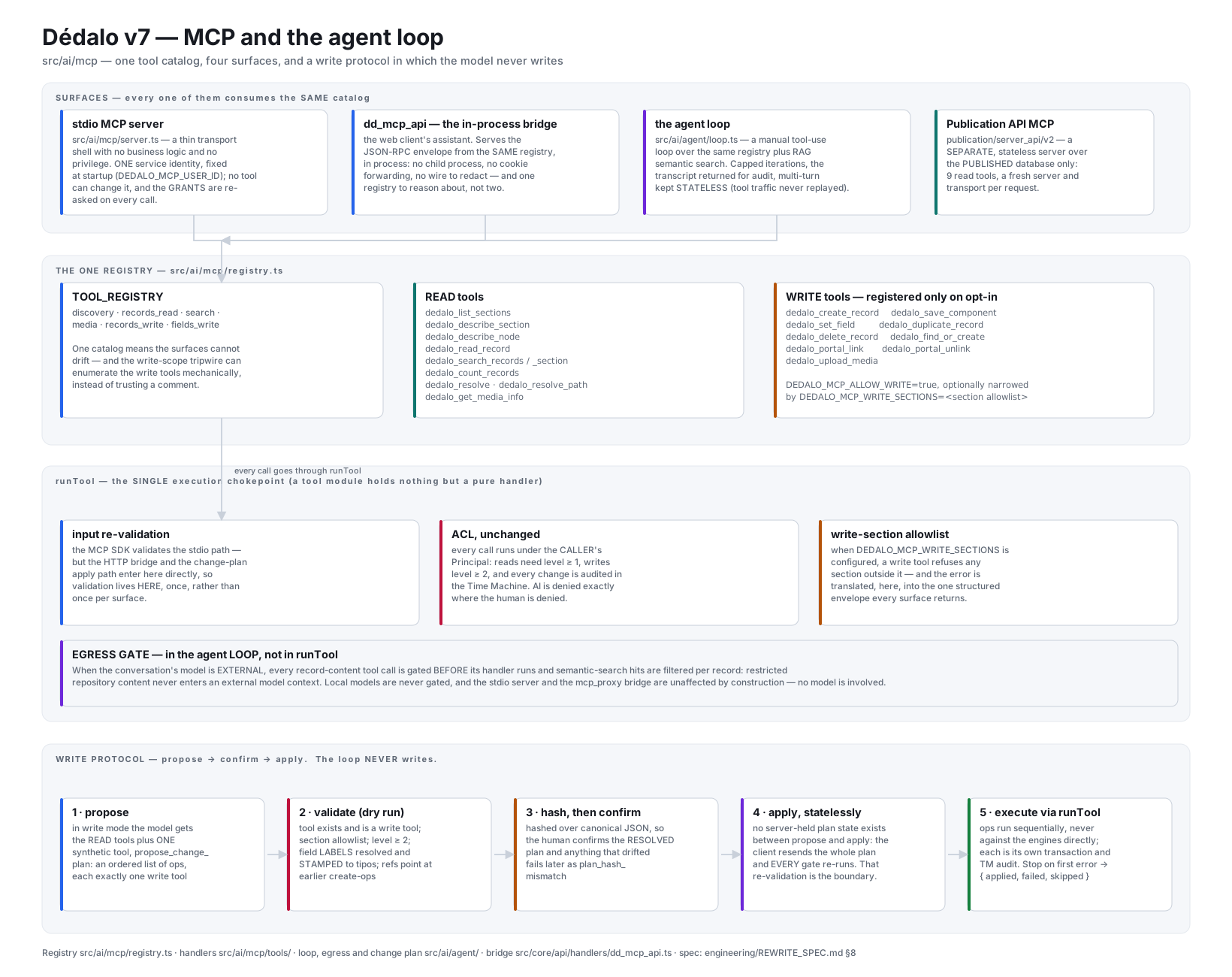
The tool layer behind the panel — click the diagram to open it full size. The sketch below is the assistant's own request path through it.
 Browser (thin chat panel)
   │  question + conversation history + current-record context + chosen model
   ▼
 dd_mcp_api : agent_chat_stream           ← the work API, over your normal session + CSRF
   │  server-side system prompt + tool-use loop
   ├──▶ Anthropic  (an external model, e.g. Claude)          egress: external
   ├──▶ a LOCAL endpoint (Ollama / vLLM / LM Studio)         egress: local
   ▼
 TOOL_REGISTRY  (search / read / discovery / write tools)   ← same ACL as the human
   +  RAG tools: dedalo_semantic_search · dedalo_retrieve_passages (cited grounding)
   │  every record-content tool passes an EGRESS gate on external models
   │  (RAG hits/passages: host record AND every deep-resolution CONTRIBUTOR section)
   │  write mode ▶ a change plan (never executed inside the loop)
   ▼
 you review the plan ▶ dd_mcp_api : agent_apply             ← the confirmed edit
The three moving parts:
| Part | Where | Role |
|---|---|---|
| Chat client | tools/tool_assistant/ (browser) |
Renders the conversation, streams the answer, shows tool activity, presents the change-plan confirm card. Holds no model and no secret. |
| Agent bridge | dd_mcp_api (src/core/api/handlers/dd_mcp_api.ts) |
The server actions the client calls: agent_models, agent_chat / agent_chat_stream, agent_apply. Runs under the logged-in user's principal. |
| Agent | src/ai/agent/ + src/ai/mcp/ |
The tool-use loop, the model providers, the model catalog, the egress gate, the change-plan harness. |
How it relates to the other AI surfaces
Dédalo has three distinct AI-facing surfaces. They share the tool layer but serve different jobs:
| Surface | Audience | Data | Doc |
|---|---|---|---|
| AI Assistant (this section) | People inside the work app | Live, private work data | here |
dd_rag_api — grounded Q&A |
Programmatic callers | Indexed work data, cited answers | RAG & semantic search |
| Publication API v2 MCP | External MCP clients (Claude Desktop, agents) | Published diffusion data | Publication MCP |
There is also a stand-alone MCP server (src/ai/mcp/server.ts) that exposes the same tool registry to external MCP clients over stdio — useful for connecting Claude Desktop or Claude Code to a Dédalo instance for power users. It is configured separately (the DEDALO_MCP_* keys) and is out of scope for this section; see the configuration reference for the pointer.
Is it on? (a 10-second check)
The assistant is off by default. It is live when:
DEDALO_AGENT_HTTP_ENABLED=trueis set in../private/.env, and- at least one model is reachable — either
ANTHROPIC_API_KEYis set, or aDEDALO_AGENT_MODELScatalog is configured.
When it is off, every assistant action refuses like an unknown action, and the chat panel shows a "disabled on this server" message instead of an input box. See Installing & enabling for the full first-run walkthrough.
Reading map
Read top to bottom for a full setup, or jump to what you need:
- Installing & enabling — turn it on, where it appears in the UI, verify it works, common first-run errors.
- Connecting models — the model catalog: Anthropic (cloud) and local endpoints (Ollama, vLLM, LM Studio); per-model privacy class; vision.
- Configuration reference — every setting, its default and its effect; write mode; the request limits.
- Privacy & security — the guarantee that matters: how the assistant enforces the same permissions as the human, and how the egress gate keeps restricted records from ever reaching an external provider.
- Use cases — what it is good for, with concrete cultural-heritage scenarios.
- Cookbook — recipes: prompt patterns for end users, and HTTP/SSE integration recipes for developers.