Architecture overview
This is the "how it all fits together" map of Dédalo v7. It is written for a developer who has just cloned the repository and wants the mental model before diving into any single subsystem. Every concept here has a dedicated document; this page only connects them.
If you have not yet read the Introduction and the Ontology, start there. The rest of this page assumes you know that a section is the abstraction of an SQL table, a component is the abstraction of a column, and that a tipo is the alphanumeric code that identifies any node in the ontology.
Quick nomenclature pointers: Glossary · Sections · Components · Ontology · Locator · dd_object · RQO · SQO · request_config
The two systems
Dédalo is not one application but two, sharing one body of data.
- The work system — the back office where curators and researchers create,
edit and relate records. Its server is a TypeScript server on the Bun
runtime (
src/server.ts, a single long-lived process — see below); its client is HTML, CSS and JavaScript. It talks to PostgreSQL, where all data lives as JSON in thematrixtables. The work API is the Dédalo API (see RQO). - The publication / diffusion system — the read side that publishes the subset of work data marked for publication into a classical SQL database (MariaDB/MySQL by default) with one table-and-columns schema per section, so that websites and third-party portals can consume it. Its API is the diffusion API, and it speaks a flat, denormalized dialect rather than the abstract ontology dialect of the work system.
Both systems have a server half and a client half (HTML/CSS/JS). Both servers
run as native TypeScript on Bun — diffusion is a native subsystem of the same
codebase (src/diffusion/), publishing via spawned job-runner processes under
the main server's control (see
Diffusion). This document is almost
entirely about the work system, because that is where the ontology,
sections, components and the request lifecycle live. Diffusion is the
downstream consumer.
flowchart LR
    subgraph work["Work system (back office)"]
        WC["Client: HTML / CSS / JS"]
        WS["Server: TypeScript / Bun"]
        PG[("PostgreSQL<br/>matrix tables (JSON)")]
        WC <-->|"Dédalo API (RQO)"| WS
        WS <--> PG
    end
    subgraph diff["Diffusion system (publication)"]
        DC["Client / portals / websites"]
        DS["Server: TypeScript / Bun"]
        SQL[("MariaDB / MySQL<br/>classic columns")]
        DC <-->|"Diffusion API"| DS
        DS <--> SQL
    end
    WS -.->|"publish marked data"| DS
    ONT(["Ontology<br/>(active schema)"])
    ONT -.->|drives| WS
    ONT -.->|maps formats| DS
Prose description of the diagram above: Two boxes sit side by side. On the
left, the work system contains a client (HTML/CSS/JS) and a server
(TypeScript on Bun) that exchange Request Query Objects over the Dédalo API;
the server reads and writes PostgreSQL, where data lives as JSON in the
matrix tables. On the right, the diffusion system contains portals/websites
and a TypeScript/Bun server exchanging data over the diffusion API; that server
reads and writes a classic SQL database with conventional columns. A dotted arrow
runs from the work server to the diffusion server labelled "publish marked
data" — diffusion is downstream. Below everything, an "Ontology (active
schema)" node sends dotted arrows to both servers: it drives the work system
and maps the output formats for diffusion.
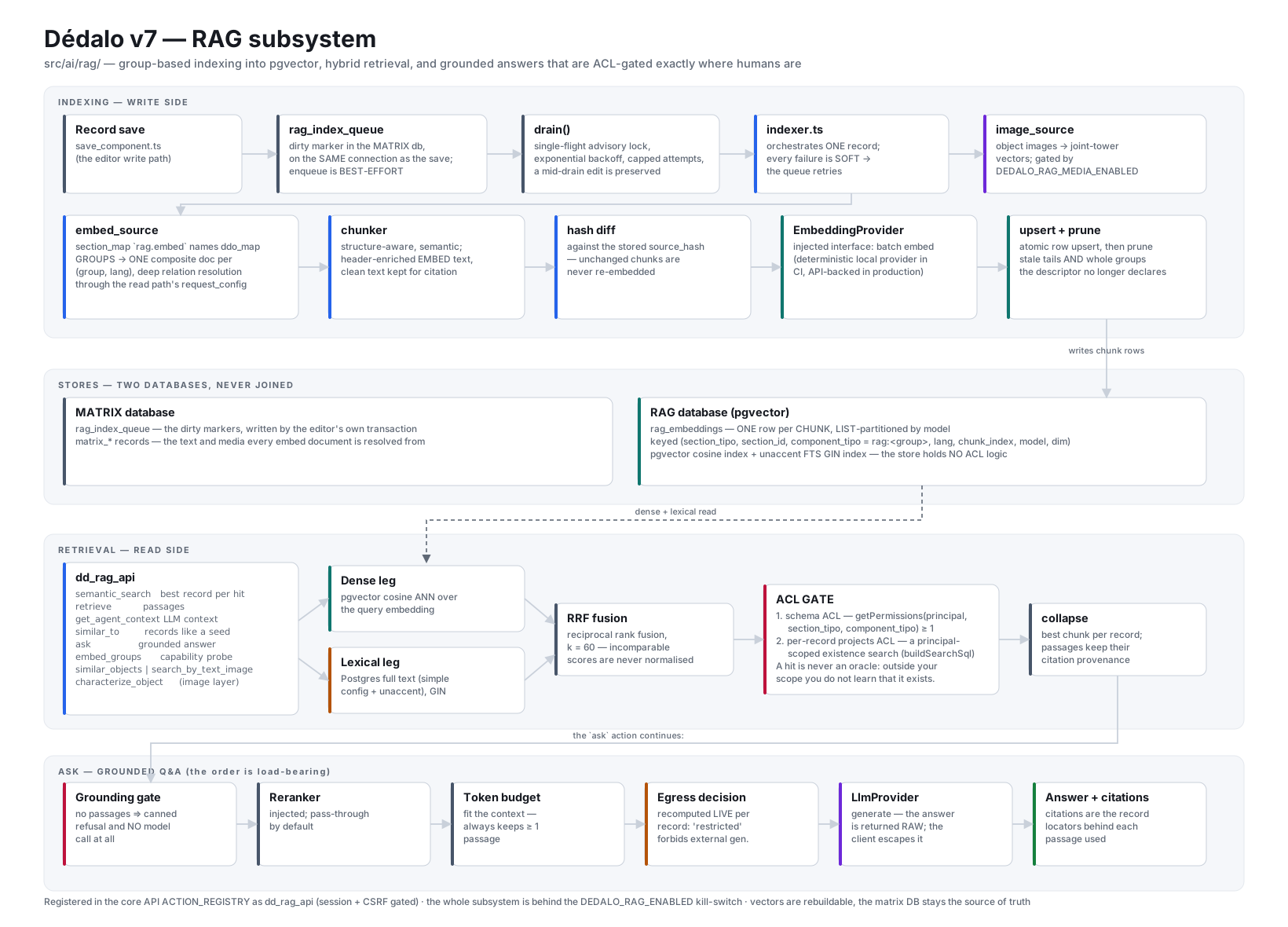
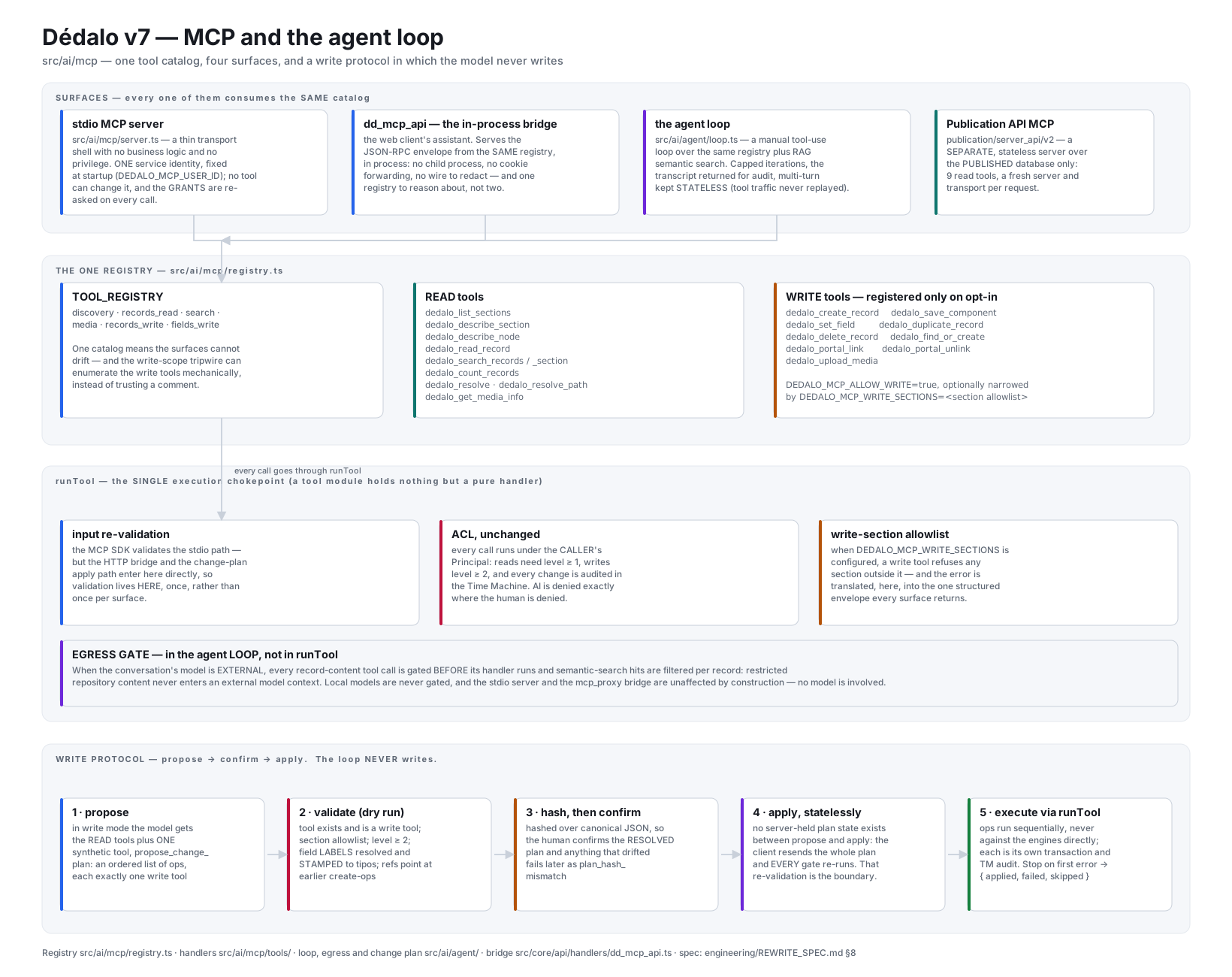
Architecture diagrams
These are the presentation-sized companions to the prose on this page and on the
subsystem pages. They live once, under docs/assets/images/diagrams/, and each
is embedded from the page it documents — click any diagram to open it full
size.
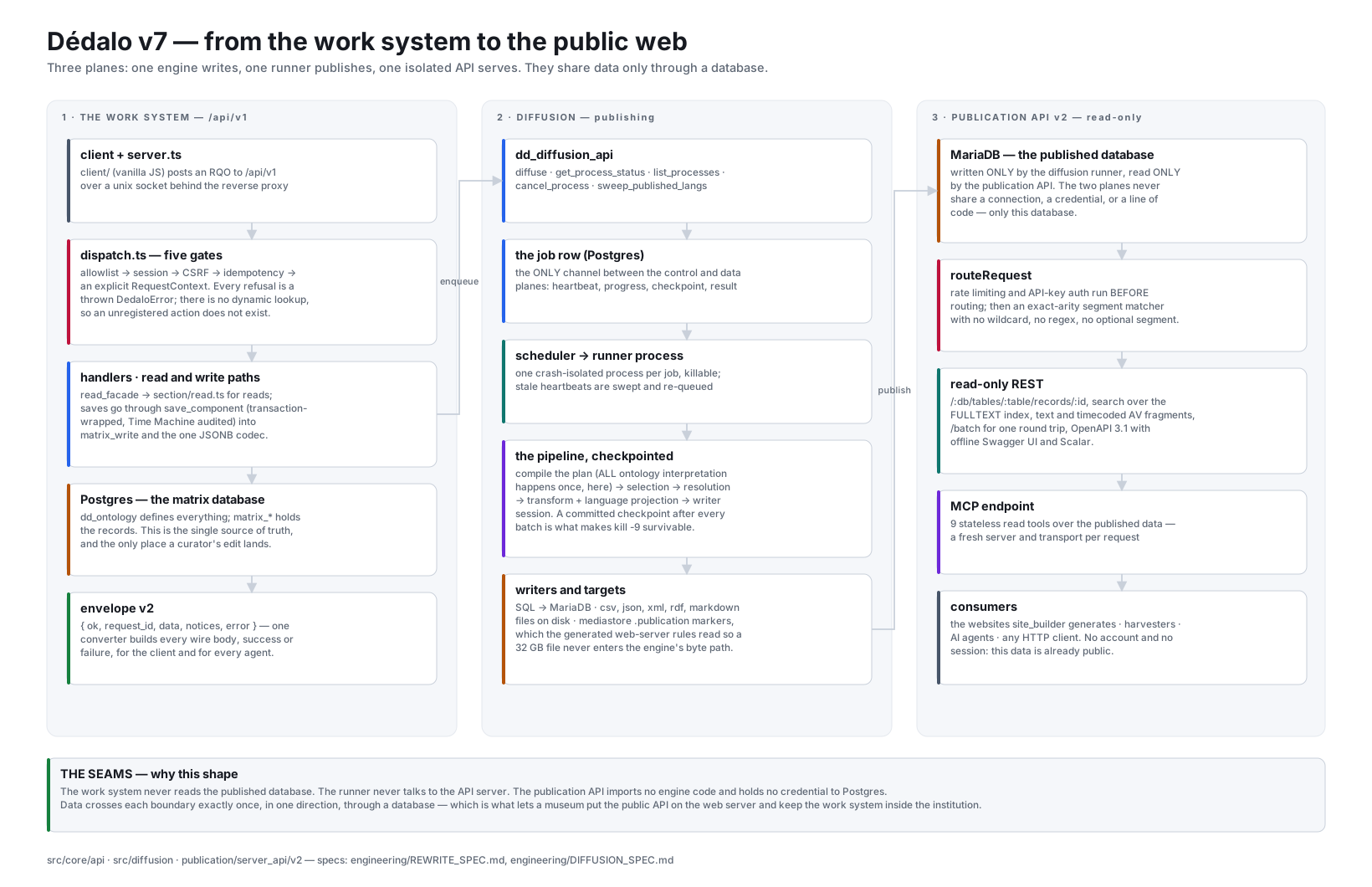
Prose description of the diagram above: three columns, read left to right.
The first, the work system, runs down from the client and server.ts through
the five dispatch gates and the handler classes into the read and write paths,
ending at the PostgreSQL matrix database and the envelope every answer is
wrapped in. The second, diffusion, starts at dd_diffusion_api, passes
through the durable job row and the scheduler that spawns one runner process,
and down the runner's pipeline into the format writers and their targets. The
third, the publication API, starts at the published MariaDB database that the
runner wrote, and rises through the routing choke point, the read-only REST
surface and the MCP endpoint to the websites and agents that consume it. A
single arrow joins the first column to the second (the engine enqueues a job)
and a single arrow joins the second to the third (the runner publishes rows and
files) — each boundary is crossed once, in one direction, through a database.
| Diagram | Documented in |
|---|---|
| From the work system to the public web — the three planes and the two seams between them | this page |
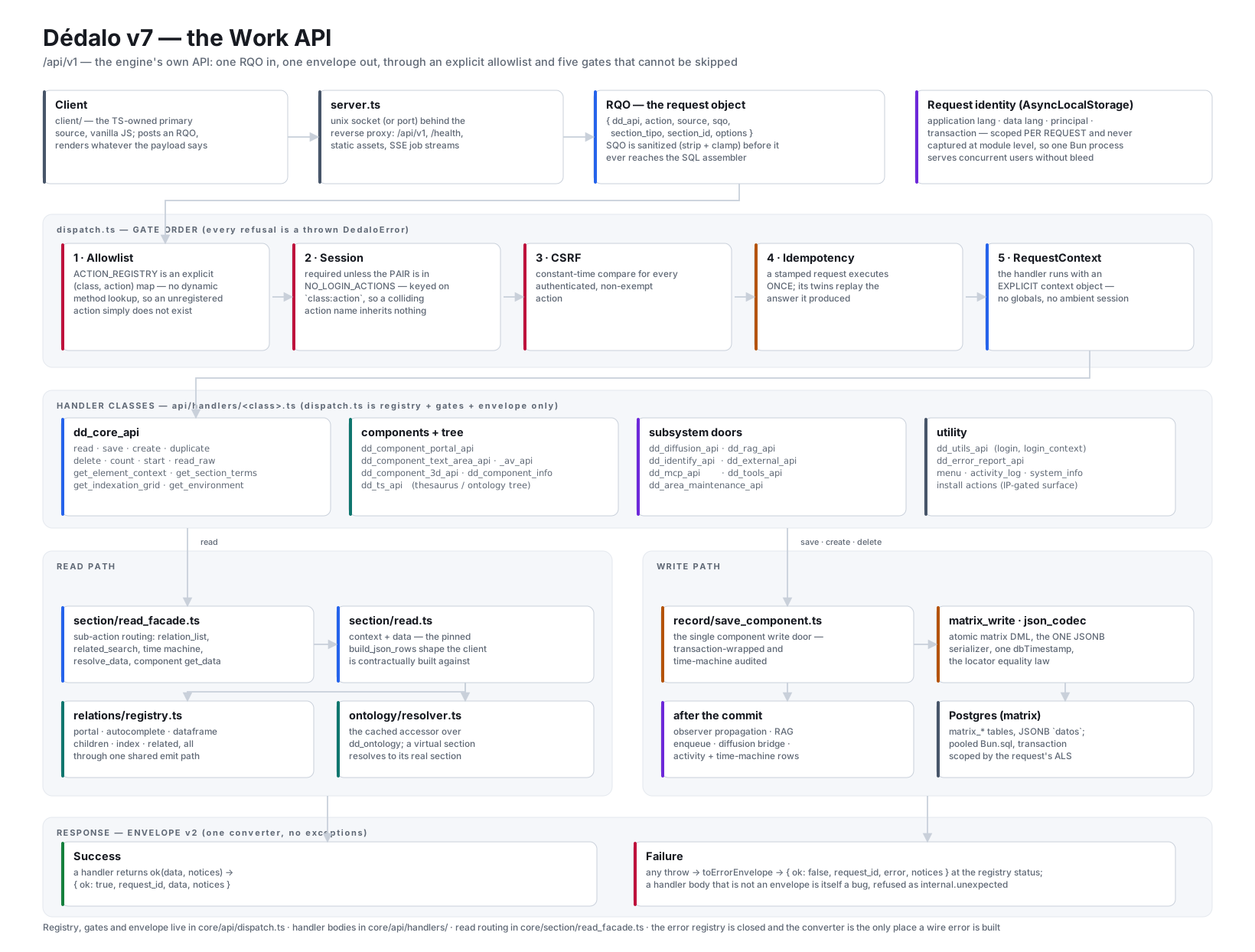
| The Work API — one RQO in, five gates, handler classes, the read and write paths, envelope v2 | API |
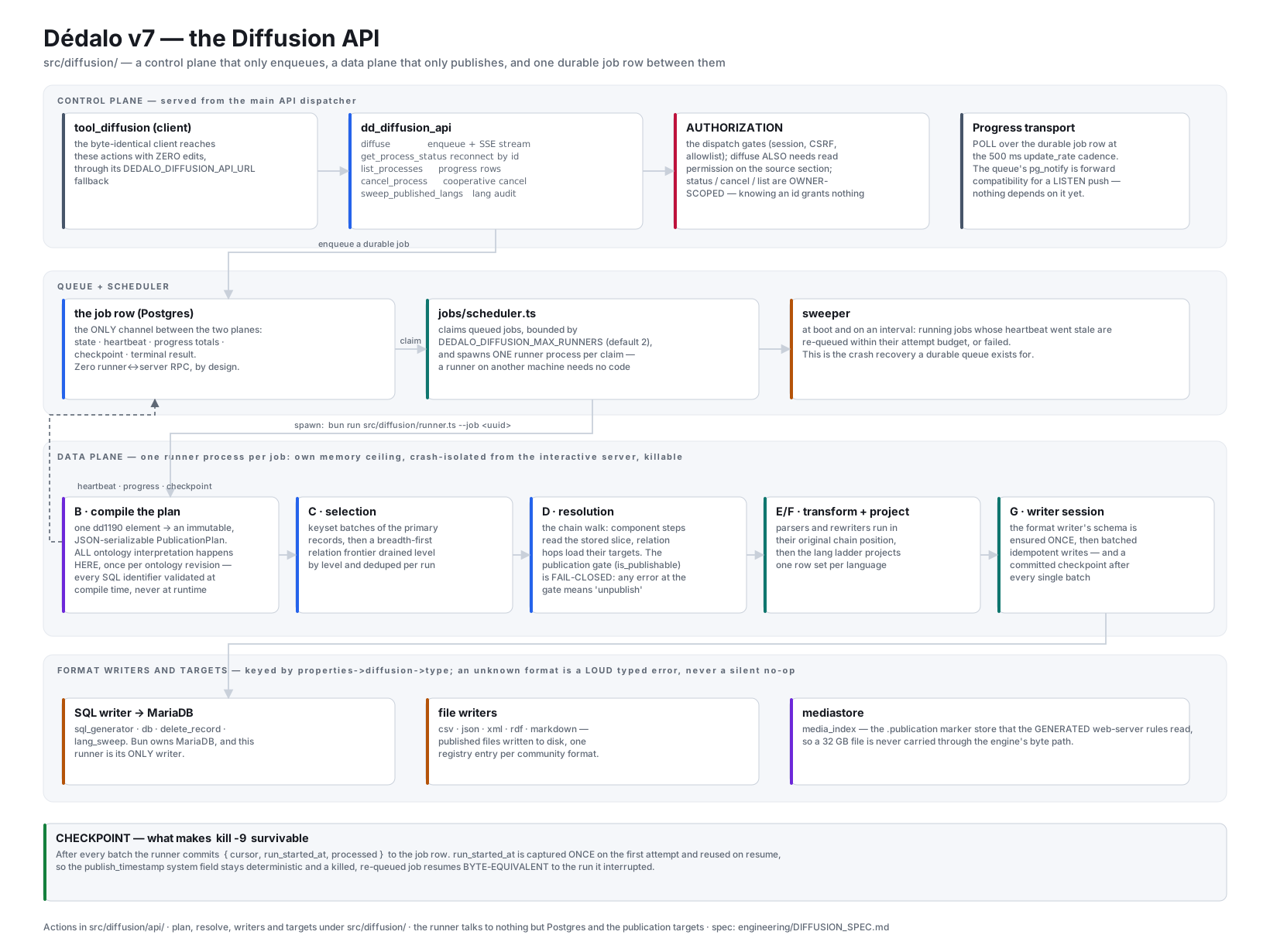
| The Diffusion API — control plane, durable job row, runner pipeline, writers and targets | The diffusion engine |
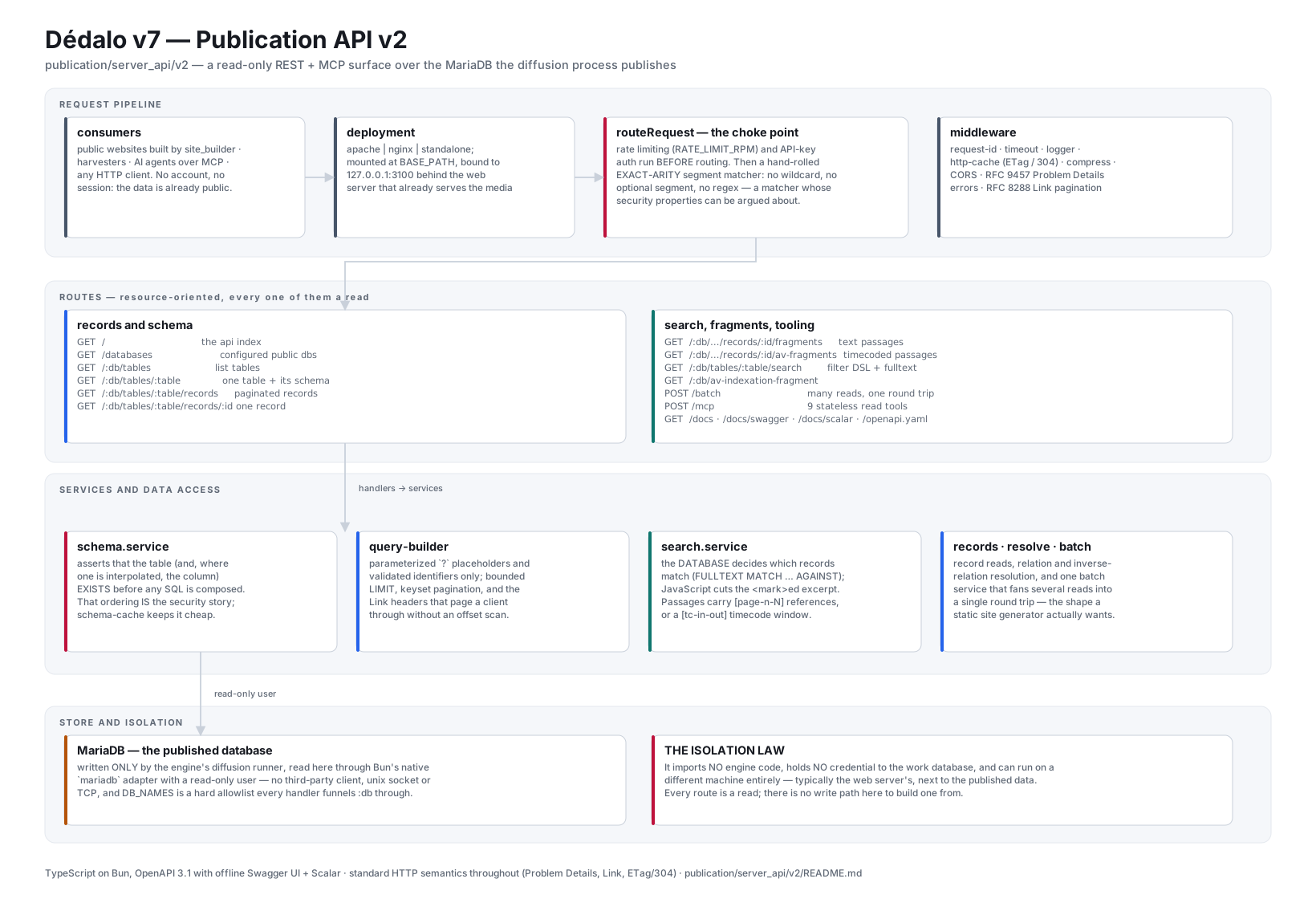
| Publication API v2 — the routing choke point, the route table, the services, and the isolation law | Publication API v2 |
The RAG subsystem — indexing, the two stores, hybrid retrieval and its ACL gate, the ask pipeline |
RAG & semantic search |
MCP and the agent loop — the surfaces, the one tool registry, runTool, and the propose-confirm-apply protocol |
The AI Assistant |
The matrix data model
Since v4 Dédalo abandoned the classic one-table-per-entity SQL schema. Instead,
almost everything lives in a handful of identically shaped tables named
matrix, matrix_hierarchy, matrix_users, and so on. The three identity
columns are always the same; the record itself is stored as JSON:
| column | meaning |
|---|---|
id |
the unique row id of the physical table |
section_id |
the record id within its section (unique per section_tipo, not per table) |
section_tipo |
which section (which abstract "table") this row belongs to |
| JSON payload | the whole record, stored as JSONB — one datos column in the legacy / matrix_hierarchy shape; split into typed JSONB columns in the v7 matrix (see note) |
A People record and an Interview record can both have section_id = 1 because
they live under different section_tipo values (rsc197 vs oh1). The payload
JSON keys are component tipos, not human field names — the human names live in
the ontology and are resolved at runtime per language.
Physical storage of the payload. Conceptually the record is one JSON object, and the legacy and
matrix_hierarchytables do keep it in a single JSONB column nameddatos. The v7matrixtable instead splits that same payload across several typed JSONB columns —data,string,number,relation,date,iri,geo,media,misc,relation_search,meta— assigning each component to one column by its model. The model→column mapping isgetColumnNameByModel()insrc/core/ontology/resolver.ts, and the JSONB column set isMATRIX_JSONB_COLUMNSinsrc/core/db/matrix.ts, so PostgreSQL can index every data shape. Sections documents the full column map. The rest of this page keeps the single-payload mental model for clarity.
erDiagram
    PEOPLE_SQL {
        int id PK
        string name
        string surname
    }
    INTERVIEW_SQL {
        int id PK
        string title
    }
    matrix {
        int id PK
        int section_id
        string section_tipo
        jsonb datos
    }
Prose description of the diagram above: The first two entities,
PEOPLE_SQL and INTERVIEW_SQL, show the classic approach: each concept gets
its own table with its own typed columns (name, surname; title). The third
entity, matrix, shows the Dédalo approach: a single table with only id,
section_id, section_tipo and a jsonb datos column. Where classic SQL needs
N tables for N concepts, Dédalo needs one — the concept is encoded in
section_tipo and the columns are encoded as keys inside datos.
The same People record in both worlds:
classic SQL people table |
||
|---|---|---|
| id | name | surname |
| 1 | Alicia | Gutierrez |
// one row in the Dédalo `matrix` table
// (payload shown as a single conceptual `datos` object; v7 splits it across typed columns)
{
    "id"           : 1,
    "section_id"   : 1,
    "section_tipo" : "rsc197",
    "datos" : {
        "section"    : "rsc197",
        "section_id" : 1,
        "rsc85"      : "Alicia",
        "rsc86"      : "Gutierrez"
    }
}
A full Dédalo installation has roughly 28 physical tables — 24 of which are this same four-column shape — yet expresses around 1,100 logical sections with some 16,000 logical fields. The schema explosion that would cripple classic SQL is folded into JSON and the ontology. The price is paid in resolution: reading a field is never a column read; it is an ontology lookup followed by JSON traversal. (See Locator for the matrix tables in detail.)
The ontology is the active schema
The ontology is not documentation about the schema — it is the schema, and
it is live. There is no CREATE TABLE anywhere; sections and components are
nodes in one hierarchical ontology (stored in dd_ontology, with instances in
the matrix tables). Dédalo reads the ontology at execution time and resolves it
into the running objects dynamically — server-side, per-model descriptors
(src/core/components/component_*/descriptor.ts, gathered by
src/core/components/registry.ts) plus the JS client objects — so editing a
node changes behavior with no code change. Changing a component_select into a
component_autocomplete is a node edit, not a migration.
Each node is a single JSON object. The load-bearing fields:
{
  "tipo"           : "rsc197",
  "parent"         : "rsc203",
  "model"          : "section",
  "model_tipo"     : "dd6",
  "order_number"   : 5,
  "tld"            : "rsc",
  "is_translatable": false,
  "lg-eng": "People", "lg-spa": "Personas", "lg-cat": "Persones",
  "relations"  : [ { "tipo": "rsc75" } ],
  "properties" : { }
}
tipois the unique id; it is a TLD + sequence:rsc197is the 197th node of thersc(Resources) TLD,oh1is the first node ofoh(Oral History),dd5the fifth core node. Core TLDsdd,ontology,lg,hierarchyare mandatory; domain TLDs (rsc,tch,oh, …) and custom local TLDs extend the tree by settingparentto an existing node.model(resolved viamodel_tipo, e.g.dd6→section,dd592→component_portal) declares what logic the node uses.parentplaces the node in the tree; the resolved context also carries aparent_grouper(the layout parent, usually asection_group), derived fromparentrather than stored on the node.- the
lg-*keys are the translatable label (the term object). properties(JSONB) is the per-node descriptor: behavior, options, layout/CSS, andrequest_config.relations(JSONB) is the node's list of{"tipo": …}references to other definitions — herersc75, markingrsc197a virtual section that borrows the real section's children. Both flow, through the structure-context cache, into the context the client renders (see request_config and dd_object).
Node relations is not record data
A node's relations array points at other ontology nodes. It has
nothing to do with a record's stored locators, which live in
the relation column — singular — of the record's matrix row, keyed by
component tipo. Same word, two unrelated things; see
Sections.
The areas → sections → components → data hierarchy
The ontology is a tree. The top levels organize the application; the bottom level is the actual data.
- Area — a top-level grouping shown in the main menu (e.g. "Intangible Heritage"). Areas contain sections.
- Section — the abstraction of a table (model
section); a group of records of the same kind (People, Interviews). See Sections. - Component — the abstraction of a column (model
component_*); a typed field inside a section, grouped undersection_groupnodes for layout. See Components. - Data — the actual records, stored as JSON in the matrix tables, with keys that are component tipos.
flowchart TD
    A["Area: Intangible Heritage (dd323)"]
    A --> S1["Section: People (rsc197)<br/>model = section"]
    A --> S2["Section: Oral History (oh1)<br/>model = section"]
    S1 --> G1["section_group (layout)"]
    G1 --> C1["component_input_text<br/>Name (rsc85)"]
    G1 --> C2["component_input_text<br/>Surname (rsc86)"]
    S1 --> C3["component_portal<br/>Birth town (rsc91)"]
    C1 --> D[("Record data in matrix<br/>{section_tipo: rsc197, section_id: 1,<br/>rsc85: Alicia, rsc86: Gutierrez}")]
    C2 --> D
Prose description of the diagram above: At the top is the area "Intangible
Heritage". It branches to two sections, "People" (rsc197) and "Oral History"
(oh1), both with model section. The People section branches to a
section_group layout node, which in turn holds two component_input_text
fields, "Name" (rsc85) and "Surname" (rsc86); People also directly holds a
component_portal, "Birth town" (rsc91). The two text components point down to
a single record stored in the matrix table — a JSON object keyed by section_tipo,
section_id and the component tipos. The tree is the schema; the bottom box is the
data described by that schema.
Abstraction layers: the cost and the benefit
Dédalo never calls things directly. To resolve a single field, the runtime fetches the ontology node, often follows it to other nodes (a portal points into another section whose components must themselves be resolved), and only then traverses JSON to get the value. The layers, top to bottom:
- Ontology nodes — the active definitions (areas/sections/components/tools).
- Models — on the server, the TS descriptors (
section,component_input_text,component_portal, …) chosen by each node'smodel; on the client, the same-named JS classes. - Instances — runtime objects built per request, carrying a context and data (see Components and dd_object).
- The datum
{context, data}— the transport unit;contextis the description (from the ontology),datais just the values. - Locators — typed pointers that turn standalone records into a relational graph (see Locator).
- The matrix JSON — the physical storage.
Benefit: extreme flexibility. The schema, the relations, the render and even the output format (RDF, JSON-LD, Dublin Core, CIDOC, MARC21, CSV…) are all ontology-driven, so Dédalo can re-shape data to any standard without touching code or the database. Cost: resolution is slower than a direct column read, and the complexity of resolving one record grows quickly as relations deepen. This trade-off is the central design decision of the whole system and explains the caches you will meet (structure-context cache, instance caches, request_config caching).
Server build vs client render: the data flow
The server no longer renders HTML. It resolves data and ships a normalized object (the dd_object / ddo) carrying context (the ontology description: tipo, model, mode, label, properties, css, request_config, permissions, tools) and data (only the values). The client turns that into DOM.
flowchart LR
    O(["Ontology node<br/>(model, properties, relations)"])
    O --> B["Server build:<br/>resolve engines (structure_context,<br/>section/read.ts emitDdoData, relations/)"]
    B --> CTX["context<br/>(description: label, model, properties,<br/>css, request_config, permissions, tools)"]
    B --> DAT["data<br/>(values only: array of {id, value, lang?})"]
    CTX --> DDO["ddo / datum {context, data}"]
    DAT --> DDO
    DDO -->|JSON API response| R["Client render layer<br/>(ui.component builders)"]
    R --> H["DOM: wrapper_component > content_data > content_value > value"]
Prose description of the diagram above: It reads left to right. An ontology
node (with its model, properties and relations) feeds the server build step —
in the TS server, the horizontal resolve engines (src/core/resolve/structure_context.ts
for context, src/core/section/read.ts's emitDdoData and src/core/relations/
for data, dispatched via each model's descriptor rather than a per-class
factory). That build emits two things: a context (the description — label,
model, properties, css, request_config, permissions, tools) and a data
payload (values only — an array of {id, value} items, with lang when
translatable). Both are packed into a single ddo/datum of shape
{context, data} and sent as the JSON API response. The client render layer
(the shared ui.component builders, copied over unchanged) consumes that datum
and produces the DOM tree
wrapper_component > content_data > content_value > value. The key idea: the
server describes, the client draws; the ontology is the source of the
description.
The datum contract
The persisted and transmitted unit is {context, data}:
datacarries values only: an array of items{id, value, lang?}, wherevalueis the literal payload or a locator, andlangis present only for translatable components.contextcarries the description — tipo, model, mode, label,properties,css,request_config, permissions and tools — never the values.
A component never touches the database directly; persistence is delegated to
its section's write chokepoint through explicit functions rather than instance
methods — reads resolve through src/core/section/read.ts (emitDdoData) and
the relations/ engines, and writes go through
src/core/section/record/save_component.ts and
src/core/section_record/record_write.ts (persistRecordKeys/
persistRecordColumns), the single place that reads and writes the matrix.
There is no factory and no per-component class to instantiate: a model is
looked up in the components registry (src/core/components/registry.ts) and
dispatched to its descriptor and the shared resolve/save engines; tipo and
section_tipo are mandatory and the model is force-corrected from the
ontology. Modes are edit (read/write a real record), list (read-only
listing), search (build SQO filters; saves blocked) and tm (Time Machine
read; saves blocked).
How components compose into sections, and how portals link across them
A section node is the table; its component children point back at it with
parent = <section_tipo> and are arranged for layout under section_group
nodes. When a section is built, it gathers its component children, resolves
each (in the TS server, one pass of emitDdoData per ddo — see
dd_object), and assembles
their contexts and data into the section's response. Most components are
literal — they own their value (input_text, number, date, media). Others
are related — they store locators instead of literals and
resolve their displayed value from a target record.
component_portal is the canonical cross-section link. Its data is not a value
but an array of locators of shape
{type, section_tipo, section_id, from_component_tipo} (the related-components
reference). type is the relation-type tipo — for a portal it defaults to
dd151 (the generic link). section_tipo/section_id point at the target
record; from_component_tipo records which component owns the locator. To show a
value, the portal resolves each locator against the target section/component
via expandPortal() in src/core/relations/relation_core.ts (dispatched through
src/core/relations/registry.ts and the per-model resolver in
src/core/relations/models/portal.ts) — so the value is always live: edit
the target record and every portal that links to it shows the change. A
record's relation JSONB column holds every relation component's locators in
one place, as an object keyed by the owning component tipo —
{"rsc91": [ … ], "rsc1435": [ … ]} — so a component slices out its own subset
by that key (relation_list uses from_component_tipo on the entries for the
same purpose). There is no flat record-wide array and no relations key on a
record.
flowchart LR
    subgraph People["Section: People (rsc197), section_id 1"]
        Name["component_input_text<br/>Name (rsc85) = 'Alicia'"]
        Birth["component_autocomplete_hi<br/>Birth town (rsc91)"]
    end
    subgraph Town["Section: Town (es1), section_id 3896"]
        Term["component_input_text<br/>Term = 'Valencia'"]
    end
    Birth -->|"locator { type: dd151,<br/>section_tipo: es1,<br/>section_id: 3896,<br/>from_component_tipo: rsc91 }"| Town
    Birth -.->|"resolves display value from target"| Term
Prose description of the diagram above: On the left is the section "People"
(rsc197), record section_id 1, containing a literal component_input_text
"Name" holding the value "Alicia" and a component_autocomplete_hi "Birth town"
(rsc91) — a related component of the portal family, sharing its locator
storage. On the right is a different section, "Town" (es1), record 3896,
containing a component_input_text whose term is "Valencia". A solid arrow runs
from the portal to the Town section carrying a locator
{type: dd151, section_tipo: es1, section_id: 3896, from_component_tipo: rsc91} —
that locator is the portal's stored data. A dotted arrow shows the portal
resolving its displayed value by reaching into the target record's term
component. The portal stores only the pointer; the displayed text is fetched live
from the target.
The request lifecycle
A typical round trip: the client builds a Request Query Object describing who is calling, what action to run and what to show; the Dédalo API dispatches it; the server resolves the section/component, builds the context and data, and returns a ddo; the client renders the DOM.
sequenceDiagram
    participant C as Client (JS)
    participant API as Dédalo API<br/>(src/server.ts → core/api/dispatch.ts)
    participant SRV as Section / Component resolvers<br/>(section/read.ts, relations/)
    participant ONT as Ontology + matrix (PostgreSQL)
    C->>API: RQO { source, action, dd_api, sqo, show/search/choose }
    API->>API: sanitize (zod, §7.5) + dispatch (ACTION_REGISTRY lookup)
    API->>SRV: readSection / saveComponentData(tipo, section_tipo, section_id, mode, lang)
    SRV->>ONT: read node (model, properties, relations)
    SRV->>ONT: read record datos (and resolve locators if related)
    SRV->>SRV: build context (description) + data (values) = ddo
    SRV-->>API: ddo { context, data }
    API-->>C: JSON response (result = ddo)
    C->>C: render DOM (ui.component builders)
Prose description of the diagram above: The client (JavaScript) sends a
Request Query Object to the Dédalo API — that RQO names the source (who is
calling: tipo, section_tipo, section_id, mode, lang), the action and dd_api
(what to do), an optional sqo (which records), and show/search/choose
layout maps (what to return). The server (src/server.ts) parses and
zod-validates the RQO and dispatches it through src/core/api/dispatch.ts's
explicit action registry — no dynamic method lookup or reflection. The matched handler resolves
the section or component (src/core/section/read.ts for reads,
src/core/section/record/save_component.ts for writes, the relations/
engines for related components) against its ontology node (model, properties,
node relations) and the record's stored data in PostgreSQL, resolving locators if it
is a related component. It assembles a context (the description) and data
(the values) into a ddo of shape {context, data}, which travels back
through the API as a JSON response. Finally the client renders the DOM using
the shared ui.component builders. See
RQO for the request format and dd_object for the ddo.
The multilingual model
Dédalo is multilingual to the core: every label and every translatable value can exist in many languages, and the language is never baked into the schema.
- Labels live in the ontology node as
lg-*term keys, resolved to the current application language at render time. Renaming a label in any language never touches the data or the schema. - Translatable components store one value per language; an instance is bound
to a single language at a time (an input_text instantiated in Català manages
only the Català value). The
langfield appears on eachdataitem. - Non-translatable components (e.g.
component_number) declareis_translatable: falseand store a single value under the sentinel languagelg-nolan, working otherwise identically. - With-lang-versions / transliterate is the middle ground: components such as
component_irior personal names default tolg-nolanbut can still carry a tool language when needed.
Because labels, values and the UI language are independent ontology-driven layers, the same record renders in any installed language with no duplication.
A note on search (SQO)
Reads that filter or page over records do not hand-write SQL. They build a
Search Query Object — a JSON abstraction of an SQL query (its filter maps
to WHERE, order to ORDER BY, plus limit/offset), inspired by Mango and
adapted to the matrix/JSONB model. The SQO is the query; the RQO wraps it and
adds the caller identity, the action and the layout. The server compiles the SQO
into prepared SQL over the JSONB matrix tables through a security chokepoint that
sanitizes and clamps client input. For the full contract, see SQO and,
for how it rides inside a request, RQO.
Where to go next
- Sections — the entity/class/table abstraction in depth.
- Components — the field abstraction, inheritance, datum.
- Ontology — the active schema, TLDs, node shape.
- Locator — typed pointers and the relational graph.
- dd_object (ddo) — the normalized object behind every request.
- RQO — the request format. · SQO — the query format.
- request_config — how context is configured and resolved.
- Glossary — the full nomenclature table.