command palette
See also: page · menu · inspector · UI building blocks
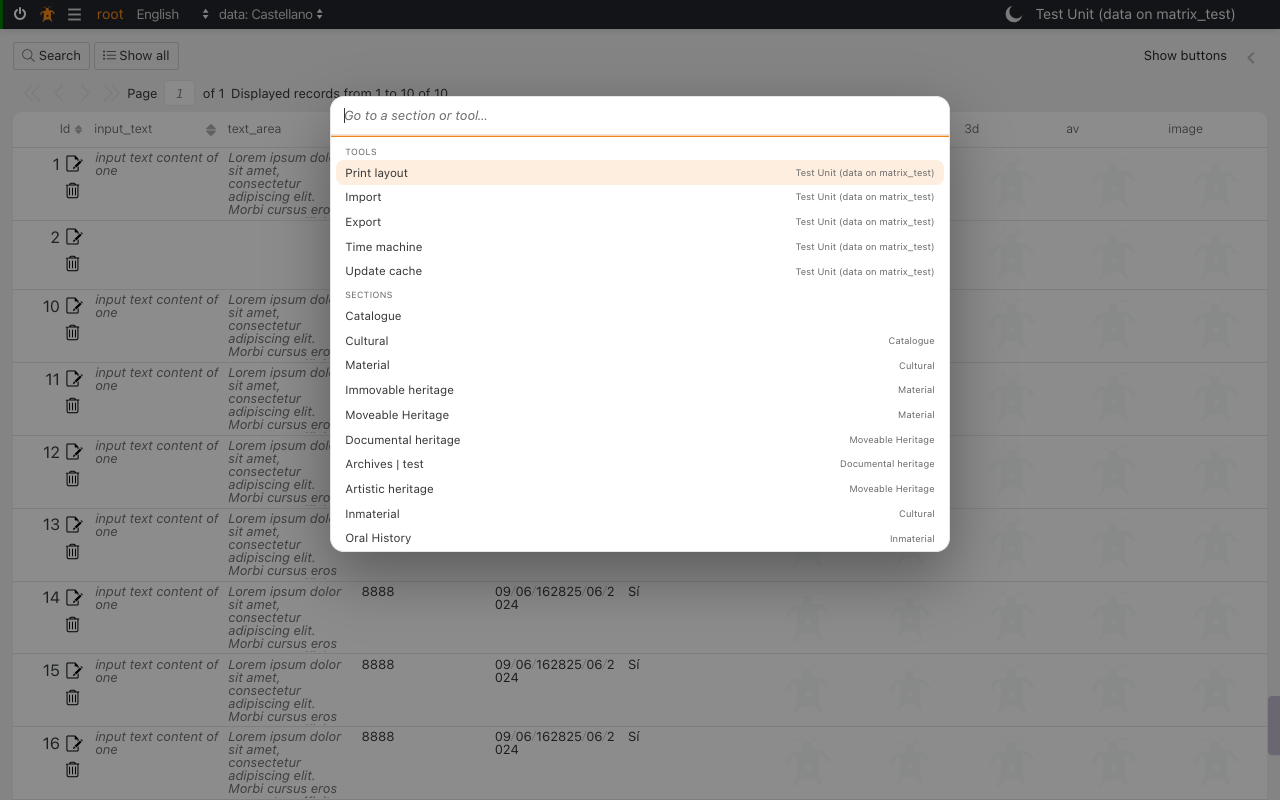
The command palette is a search box that opens anywhere in the back office with ⌘+K on a Mac or Ctrl+K elsewhere. You type part of a name and press Enter to jump to a section or open one of the current section's tools. This page explains what it does and does not do, and how it works, for users and for developers who extend it.
Why it exists
Cataloguers often repeat the same round in several sections: open the Image
section (rsc170), open Diffusion; open the Audiovisual section (rsc167),
open Diffusion again. Opening a tool is already one click from the
inspector, so the slow part is reaching each section through the
menu tree. The palette shortens that to a few keystrokes:
flowchart LR
    subgraph before["Through the menu"]
        direction LR
        A1["Hover the top level"] --> A2["Hover the area"] --> A3["Find the section"] --> A4["Click"] --> A5["Click the tool"]
    end
    subgraph after["Through the palette"]
        direction LR
        B1["⌘K"] --> B2["Type 'aud'"] --> B3["Enter"] --> B4["⌘K, type 'dif', Enter"]
    end
Every tool of every section can be reached the same way, so no tool gets a keyboard shortcut of its own. One key to remember means no two tools can claim the same keys, no tool can take a key the browser owns, and a tool added later is listed without anyone choosing a key for it.
Using it
| key | action |
|---|---|
| ⌘+K / Ctrl+K | Open the palette (pressed again inside it: close it). |
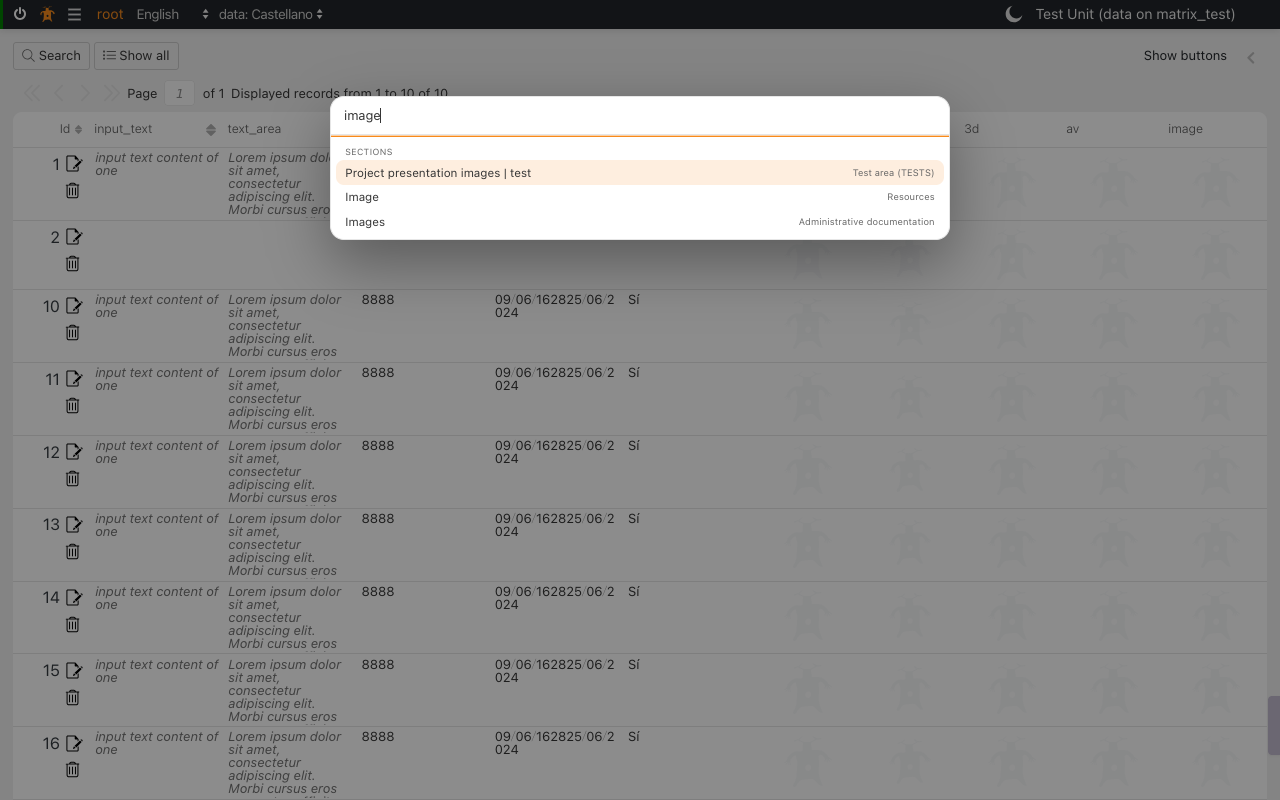
| typing | Filter every group, by name and by the text on the right. Case and accents are ignored: audiovis finds Audiovisual, image finds Image and Images. |
| ↓ / ↑ | Move the selection. It wraps from the last row to the first. |
| Enter | Run the selected row. |
| Esc | Close. Focus goes back to where it was before the palette opened. |
| click outside the box | Close. |
Each row shows its name on the left and, on the right, where it belongs: the section a tool acts on, or the menu entry a section sits under.
What it lists
Rows are grouped, always in this order:
flowchart TB
    K["⌘K / Ctrl+K"] --> G{"Can it open here?"}
    G -- "a modal is open, or this is a tool window" --> X["Nothing happens"]
    G -- "yes" --> P["1. Page groups<br/>(e.g. Maintenance widgets)"]
    P --> T["2. Tools<br/>of the current section"]
    T --> R["3. Recent<br/>last 8 sections visited"]
R --> S["4. Sections<br/>the whole menu"]| group | source | notes |
|---|---|---|
| Page groups | Added by the page you are on (see Adding a group). | Today only the Maintenance area (dd88) adds one: its widgets, listed first. A widget that can destroy data is shown in red, as on the maintenance map. |
| Tools | The current section's tools — the same list its tools menu shows. |
Opens the tool exactly as its button does, with the same section and the same selected records. tool_identify is listed only when object identification is enabled. |
| Recent | The sections you went to most recently, newest first, at most 8. | Kept per user, in this browser. |
| Sections | The menu's own data (tree_datalist). |
Areas are listed too, as the menu lets you open them. Untranslated names stay in italic, as in the menu. |
Nothing is fetched from the server when the palette opens: every group is built from what the page has already loaded.
What it does not do
- It does not grant or widen access. Sections come from the menu, which the server has already filtered by your permissions, and tools come from the section's own context. If you cannot open something through the menu or the section, it is not in the palette either.
- It does not search records. It finds sections and tools by name, never the data inside them. Use the section's search for that.
- It does not open over a modal or inside a tool window. In a tool opened in its own window there is no menu and no section to act on.
- It does not remember a section you reached by typing its address. Only moves made inside the application to a menu section (through the menu, the palette, or any other in-app link to it) are added to Recent. Reloading the page is not a move.
- It does not share recents between browsers or devices. They are saved in this browser only; another computer, or a cleared browser, starts empty.
- It does not switch the section a tool works on. A tool always acts on the section you are in. To run Diffusion on Audiovisual, go to Audiovisual first, then open the tool.
- It does not add per-tool shortcuts, and nothing can be configured per install or per user.
Existing tool shortcuts still work
A tool can still declare keyboard events in its own properties (tool_ontology
binds Ctrl+S). The palette does not change or replace them.
How it works
The palette is one client module, client/dedalo/core/common/js/command_palette.js.
It has no server part and no setting.
Wiring
sequenceDiagram
    participant U as User
    participant P as page.js (keydown)
    participant C as command_palette.js
    participant M as menu instance
    participant S as section instance
    U->>P: ⌘K / Ctrl+K
    P->>C: open_command_palette()
    C->>C: refuse if window.modal or ?tool= in the URL
    C->>C: page groups (providers)
    C->>S: section.tools
    C->>M: menu.data.tree_datalist
    C-->>U: grouped, filtered rows
    U->>C: Enter on a row
C->>C: close, then run the row's actionpage.add_events()callsinit_command_palette(page)so the palette knows the current page, and its documentkeydownhandler opens the palette on ⌘+K / Ctrl+K.- The palette's own input handles ↑, ↓, Enter and Esc and stops them there, so the page-wide Enter (run the section search) and Esc (leave the active field) never fire while it is open.
- The box is built once, the first time it opens, and appended to
body. Rows are rebuilt on every keystroke.
What a row does
| row | action |
|---|---|
| tool | open_tool({ tool_context, caller: section }) — the same call as the tool button, so a tool that opens as a modal or a window keeps doing so. |
| section | navigate_to_menu_item() from render_menu_tree.js — the function the menu itself calls when you click an entry, including its swap_tipo redirect and the reload after a page error. |
| page group | whatever the page registered (see below). |
How recents are recorded
The palette listens to the user_navigation event, which the menu, the
palette and other in-app links publish to move the page. When the target is in the
menu, its tipo goes to the front of the list:
// published by the menu or the palette when you go to Audiovisual
event_manager.publish('user_navigation', {
    source : { tipo : 'rsc167', model : 'section', mode : 'list', config : null }
})
The list is saved in localStorage under one key per user, newest first:
// localStorage['dedalo_palette_recent_<user_id>']
["rsc167", "rsc170"]
Only tipos are stored, never labels. Each time the palette opens, every stored
tipo is looked up in the current menu: the name is shown in the current
language, and a section you can no longer open is simply left out. A menu entry
that redirects through config.swap_tipo is recorded under the menu entry's
own tipo, so it shows with the name you saw in the menu.
flowchart LR
    N["user_navigation<br/>tipo = rsc167"] --> F{"In the menu?<br/>(tipo or swap_tipo)"}
    F -- no --> I["Ignored"]
    F -- yes --> L["Move to the front,<br/>drop duplicates,<br/>keep 8"]
    L --> LS[("localStorage<br/>per user")]
    LS --> O["On open: look each tipo up<br/>in the current menu"]
    O --> V["Shown in Recent"]
    O --> D["Missing: not shown"]
Adding a group
A page area can put its own rows at the top of the palette. Register a provider when the area renders and remove it when the area is destroyed:
import {add_palette_provider} from '../../common/js/command_palette.js'

// returns the function that removes the provider again
const remove_palette_provider = add_palette_provider(() => {
    // called every time the palette opens: return [] when not applicable
    if (!document.body.contains(root)) { return [] }
    return widgets.map(w => ({
        group   : 'Maintenance',          // heading the rows appear under
        label   : w.label,                // matched by the search
        hint    : 'Database',             // right-hand text, also matched
        css     : w.danger ? 'danger' : '', // optional row class
        action  : () => open_widget(w.id) // run on Enter or click
    }))
})

// in the area's destroy()
remove_palette_provider()
This is how the Maintenance area (client/dedalo/core/area_maintenance/js/render_area_maintenance.js)
lists its widgets. Its Find a tool ⌘K button opens the same palette
(open_command_palette()), so there is one palette on that page, not two.
Always remove the provider
A provider that is never removed keeps its rows — and the area it closes
over — alive after you leave the page. Check document.body.contains(root)
inside the provider as well, so a provider that outlives its area returns
no rows.
Module reference
client/dedalo/core/common/js/command_palette.js:
| export | purpose |
|---|---|
init_command_palette(page) |
Bind the current page. The first call also starts recording recents. Called by page.add_events(). |
open_command_palette() |
Open it. Returns false, and does nothing, over a modal, in a tool window, or when there is nothing to list. |
close_command_palette(refocus = true) |
Close it and, by default, give focus back. |
add_palette_provider(fn) |
Add a page group. Returns the function that removes it. |
build_items() |
Every row for the current page, in display order: {group, label, hint, css, action}. |
get_recent() / push_recent(tipo) |
Read and update this user's recents. |
fold(text) |
Lower-case and remove accents; the search compares folded text. |
Labels used: tools, recent, sections, command_palette_placeholder and
command_palette_empty, all translated in every application language. Styles
live in client/dedalo/core/page/css/layout/command_palette.less.
Testing
test_command_palette(browser client suite,bun run test:client) builds a fake page and checks: which tools are listed, the<mark>untranslated flag, recents fromuser_navigation(withswap_tipo, a staletipoand the limit of 8), accent-insensitive filtering, Enter, the arrow keys, Esc with focus return, page groups, and that nothing opens over a modal.- The rows are native buttons kept out of the Tab order: the keyboard path is
the input's arrows and Enter. The click outside the box that closes it is
recorded in
engineering/client_a11y_backlog.json, because Esc is its keyboard equivalent.