The feature crawl
bun run test:crawl # scripts/feature_crawl.ts
In a nutshell
- What it is: an automatic tester that uses Dédalo the way people do: in a real web browser, logged in, clicking through the menus.
- Who it pretends to be: three users with different rights. One is the all-powerful
root. One is an administrator who is still limited by their permissions. One is an ordinary editor who may only work on one project. - What it does:
- It opens every section each user's menu shows them, as a list and as one record.
- On each page it checks for errors and for data the user should not see.
- It also checks basic accessibility and whether the page fits a phone screen.
- It tries to open, by typing the address directly, things the user is not allowed to reach. Each must be refused.
- It carries out a few real tasks (log in, edit and save, create a record, export) and checks the result in the database.
- Where it runs: only on the separate test database the suite builds
(
bun run test:db:setup). It never touches an installation's real records. - Result:
- A run is green when nothing new is wrong.
- It is red when any problem appears that is not already listed, with a reason, as a known one.
- With
--out <dir>it also writes a report with a screenshot of each problem.
Why it matters
A Dédalo installation holds records that several teams share, and each user may see only part of them. Most of what can go wrong there only shows up in the browser, and only for some users:
- Hiding is not protecting. A menu that hides a section is not a refusal. If the server still serves that section to someone who types its address, an editor can read another project's records. The crawl tries exactly that, as each user.
- A form can fail for one user only. A screen may work for the administrator who tested it and still break for an editor with fewer rights. The crawl repeats every page for each kind of user.
- The unit tests do not open the browser. The engine's thousands of unit tests check the server's answers. They cannot see a page that throws an error while it draws, a read-only field that can still be typed into, or a tool that never opens.
- Problems cannot pile up unnoticed. Every known problem is listed with its reason, and the list can only shrink. The crawl must also reach a minimum number of pages, so it cannot quietly skip part of the application and still pass.
What "a real browser" means here
The crawl doesn't imitate a browser. It runs Google Chrome, the same program people use, and controls it from a script.
flowchart LR
    subgraph U["Unit tests (bun test)"]
      T1[test code] -->|calls a function or<br/>sends an API request| E1[Engine]
      E1 -->|JSON answer| T1
    end
    subgraph C["Feature crawl (bun run test:crawl)"]
      T2[crawl script] -->|"opens pages, clicks, types<br/>(Puppeteer → Chrome DevTools Protocol)"| B[Chrome]
      B -->|loads HTML, CSS and the<br/>client's JavaScript| E2[Engine + suite DB]
      E2 -->|API answers| B
      B -->|what the page shows,<br/>errors, screenshots| T2
    end
How it works:
- The program. Puppeteer starts Chrome and sends it commands
over the Chrome DevTools Protocol, the same channel Chrome's own developer tools use. It
uses the Chrome installed on the machine, or the one named in
PUPPETEER_EXECUTABLE_PATH. - The pages. Chrome loads Dédalo's client from the crawl's own server: the same HTML, CSS and JavaScript an installation serves. It draws the pages exactly as a user's browser would. Nothing in the client is replaced or mocked.
- The user. Each persona gets its own isolated browser context, like a separate private window, with its own session cookie. One persona can never borrow another's login.
- The actions. Journeys type into fields key by key and click buttons with real mouse
events, so the client's own event handlers run, including the automatic save when a
field loses focus (the journey presses Tab). The
login_formjourney types the username and password into the real login form. - What it watches. Chrome reports to the script every uncaught JavaScript error, every console error and every API answer. The script also reads the page as drawn: which components rendered, whether an error panel appeared, which inputs are enabled.
- Why it matters. A unit test can only prove the server's answer was right. The crawl proves the page that answer produced works. A field drawn as editable that should be read-only, a tool that crashes while opening, or a page that throws while drawing only show up here.
Where it differs from a person at a screen:
| Feature crawl | A person | |
|---|---|---|
| Window | Invisible ("headless") by default. --headful shows it. |
Visible |
| Logging in | A session is created directly and handed to Chrome, to save time. The login_form and admin_grant_propagates journeys use the real login form. |
Always the login form |
| Screen size | 1400 × 1000. Each page is also checked at 360 × 740 (phone). | Any |
| Browser | Chrome only | Chrome, Firefox, Safari, … |
| Inspector blocks | Opened by a click event fired inside the page, not by a mouse movement | Mouse or touch |
| Reading state | Sometimes asks the client's own modules what is on screen (for example, the list of component instances), where no visible label shows it | Looks at the screen |
| Judging looks | Never: it checks behaviour, not appearance | Sees everything |
Reading this page as an AI agent
The commands, file paths and finding ids on this page are exact and can be used as
written. The ground truth is the code: scripts/feature_crawl.ts (the walk),
test/helpers/feature_crawl_ratchet.ts (known failures and banking rules),
test/helpers/journey_cases.ts and test/helpers/tool_operation_cases.ts (what is
and is not exercised). Counts on this page (pages, checks, budgets) are dated
2026-10-29. Read the current values from engineering/crawl_inventory.json and
engineering/crawl_posture_budget.json. Never run the crawl at the same time as
bun test or bun run test:client; they share one lock and the second run is refused.
At a glance
| Runs on | The suite database only (the same verified server door as bun run test:client). |
| Users | root, a non-root global admin and a project-scoped editor. |
| Visits | Every menu section in list mode, then its first visible record in edit mode. |
| Checks per page | Errors, components, inspector, tools, accessibility, keyboard, phone width. |
| Then | The permission oracle (direct-URL refusals) and the user journeys. |
| Verdict | Red on any finding not listed in the shrink-only ratchet. |
| Size | ~790 pages and ~9,600 checks per full run (floors: 774 pages, 9,351 checks). |
How a run flows
flowchart TD
    A[bun run test:crawl] --> B[Take the suite-run lock]
    B --> C[Install the crawl personas<br/>users, profiles, projects, records]
    C --> D[Start own server on the suite DB<br/>verify /health fingerprint]
    D --> E{For each persona}
    E --> F[Mint a session, own browser context]
    F --> G[Read the menu as that user<br/>getMenuTreeDatalist]
    G --> H[For each section]
    H --> I[List page: errors + posture]
    I --> J[Edit page of first record:<br/>components, inspector, tools, posture]
    J --> H
    H -->|done| K[Permission oracle<br/>non-root personas]
    K --> L[User journeys]
    L --> E
    E -->|all personas done| M[Sweep fixtures, stop server]
    M --> N[Findings minus ratchet = verdict]
    N --> O[Bank floors and budgets<br/>only with --update after green]
The walk is driven by data the server already holds. The list of sections comes from the
menu the server builds for that user. The expected permission level of each component
comes from getPermissions. The expected tools come from getUserTools. Nothing the
crawl compares against is written by hand.
Where the test data comes from
The crawl needs records to open, users to log in as and projects to separate them. None of this comes from a real installation. It is built in four layers, each with its own lifetime. Think of a theatre:
- the stage is built once and reused for every show;
- the cast arrives before each show and leaves after it;
- the props are moved around during the show and put back at the end;
- the tickets are valid for one show only.
flowchart TB
    L1["<b>1. The stage</b> — the suite database<br/>built once by bun run test:db:setup<br/>lives until you rebuild it"]
    L2["<b>2. The cast</b> — personas fixture<br/>2 users, 2 profiles, 2 projects, 2 records<br/>installed at the start of every run, removed at the end"]
    L3["<b>3. The props</b> — what journeys write<br/>edited values, a created record, a grant<br/>swept after each journey"]
    L4["<b>4. The tickets</b> — login sessions<br/>one per persona<br/>destroyed at the end of the run"]
    L1 --> L2 --> L3
    L2 --> L4
Layer 1 — the stage: the suite database
You build it once (and again whenever you want a clean start):
bun run test:db:setup
This creates a separate database, named after the application database with _test
added (for example dedalo7_myinstall_test), and fills it the way a new installation
is filled:
- A fresh installation. It uses the installer's own steps: the core database, the languages, and the default ontology.
- A marker row (
dedalo_test_marker). It says "this database is for tests". Every piece of test code that writes checks for this row first and refuses to write anywhere it is missing. That is what makes it impossible for a test to write into a real installation by mistake. - The test ontology: the generic
testTLD. It has sections built to exercise every component model, such astest3(the "playground", which has one of everything),testplace0(a small thesaurus),test1001andtest480. - Test records in those sections, plus hierarchies and the tool register.
The crawl reads this layer and doesn't change it. When it opens "the first record" of a section, that record comes from here.
Note
The crawl doesn't rebuild or reseed this layer. bun test and bun run test:client
do reseed the test3 playground wholesale, which would wipe records the crawl is
using. That is why the three commands share one lock and never run at the same time.
Layer 2 — the cast: the personas fixture
At the start of every run, test/helpers/crawl_persona_fixture.ts adds the people
and the situation the permission checks need:
| Row | Id | What it is |
|---|---|---|
User zzcrawl_admin |
948001 | Global administrator, not root |
User zzcrawl_editor |
948002 | Ordinary user, member of project A only |
| Admin profile | 948011 | Full rights on test3 |
| Editor profile | 948012 | The mixed grants shown under The three personas |
| Project A | 948021 | The editor's project |
| Project B | 948022 | A project the editor does not belong to |
test3 record |
948101 | Assigned to project A: the editor may open it |
test3 record |
948102 | Assigned to project B: the editor must be refused |
How it is done, step by step:
- Check the marker. If the database is not the marked suite database, stop.
- Clean up first. Delete these ids if a crashed earlier run left them behind.
- Insert the rows at the fixed ids above. The editor profile's grants are not typed out by hand. The fixture reads the ontology to list every component under each section, so the profile stays correct when the test ontology changes.
- Set passwords for
root,zzcrawl_adminandzzcrawl_editor, so the login journeys can type them into the real login form.
At the end of the run, the same ids are deleted again, along with their Time Machine
history. This clean-up is strict: if a row it expected to delete is already gone,
the run reports a fixture:teardown:sweep finding. Something else touched the cast
during the show, and you want to know.
Why fixed ids and a raw insert?
Fixed ids make the clean-up exact: it deletes these eight rows and nothing else. The rows are inserted directly rather than through the application, because they are the starting situation, not something under test. Everything the crawl does test then goes through the real application in the browser.
Layer 3 — the props: what journeys write
Most of the crawl only looks. The journeys act, and some of them write:
| Journey | What it writes | How it is put back |
|---|---|---|
edit_save_reload |
Types a new value into record 948101 | Record 948101 is deleted with the cast |
create_record_in_own_project |
Creates a new record in test1001, then deletes it |
Sweep of records created during the run (below) |
admin_grant_propagates |
Grants, then revokes, a permission on the editor profile | The journey revokes it; the profile is deleted with the cast |
restore_component_value |
Restores an earlier value on a cast record | Deleted with the cast |
The sweep of created records. When the application creates a record, the record's number comes from a counter that only goes up. Before a journey creates anything, the crawl notes the counter's current value. Afterwards it deletes every row of that section above that value: the record, its Time Machine history and its Activity entries. Older rows sit at or below the noted value and are never touched.
sequenceDiagram
    participant J as Journey
    participant DB as Suite DB (test1001)
    J->>DB: note counter = N
    J->>DB: create record (via the browser) → id N+1
    J->>DB: delete it (via the browser)
    Note over DB: the delete keeps a Time Machine<br/>snapshot and Activity rows
    J->>DB: sweep: remove every row above N<br/>(record, Time Machine, Activity)
Layer 4 — the tickets: login sessions
The crawl doesn't log in through the form for every page; that would be slow. For each persona it creates a session directly in the server's session store, a store that belongs to this run only, and hands the cookie to that persona's browser context. The sessions are destroyed when the run ends.
Summary table
| Layer | Created by | When | Removed |
|---|---|---|---|
| Suite database | bun run test:db:setup |
Once, by you | When you rebuild it |
| Personas fixture | crawl_persona_fixture.ts |
Start of each run | End of each run (strict) |
| Journey writes | The journeys, through the browser | During the run | After each journey, or with the cast |
| Sessions | The crawl | Start of each persona | End of the run |
What this means for you:
- If the crawl says "no
dedalo_test_markerrow", runbun run test:db:setup. - If a run crashed, just run it again. Layer 2 cleans up its own leftovers before installing.
- The application database is never opened by the crawl in gate mode. Audit mode is different: it creates no test data at all, and blocks every write.
The three personas
The crawl walks as root and as two users built by
test/helpers/crawl_persona_fixture.ts. Both live only in the suite database, at
explicit ids, and are swept after the run.
flowchart LR
    subgraph P[Persona]
      R[root]
      AD["zzcrawl_admin<br/>global admin, not root<br/>(dd244 = Yes)"]
      ED["zzcrawl_editor<br/>not admin<br/>project A only"]
    end
    subgraph S[What the editor's profile grants]
      T3["test3 — level 2<br/>except test17 (level 1)<br/>and test91 (no grant)"]
      TP["testplace0 — level 1"]
      TC["test1001 — level 2 (create)"]
      TD["test480 — no grant"]
    end
ED --> T3 & TP & TC & TD| Persona | Admin | Bound by grants | Why it is here |
|---|---|---|---|
root |
yes | no | The widest view: every section, every tool. |
zzcrawl_admin |
yes | yes (dd774) |
Proves a global admin who is not root is still limited by their grants. |
zzcrawl_editor |
no | yes | Every grant level at once: edit, read-only, hidden, denied, and one project out of two. |
The fixture only shapes the situation. The crawl reads every expected level back through the real permission functions, so a fixture typo cannot make a check pass.
What it checks on every page
| Check | Fails when |
|---|---|
js_error |
The page throws an uncaught error. |
api:<code> |
Any API answer comes back ok:false. |
error_panel |
The client shows an error panel that no API error explains. |
blank |
The section instance never renders. |
load |
The page does not load within 60 s. |
a11y:<rule> |
axe reports a violation of critical impact. |
keyboard |
15 presses of Tab never move focus off the page body. |
phone_overflow |
At 360 px wide the page scrolls sideways. |
On edit pages it also checks:
| Check | Fails when |
|---|---|
component_render:<model> |
One component per model does not reach rendered. |
component_error:<model> |
That component shows an error panel. |
component_leak:<tipo> |
A component renders although the user holds no grant on it. |
component_level:<tipo> |
The client shows a level higher than the server grants. |
component_readonly:<tipo> |
A level-1 (read-only) component has an enabled input. |
inspector |
An inspector block shows .inspector_block_failure after it is opened. |
tool_offered:<tool> |
The page offers a tool that getUserTools does not grant. |
tool_open:<tool> / tool_error:<tool> |
An offered tool fails to open, or opens with an error panel. |
And once per menu:
| Check | Fails when |
|---|---|
menu:orphan |
A menu entry's parent is not visible to the user. |
The permission oracle
Hiding a link is not security. For each non-root persona the crawl opens, by direct
URL, things that user must not reach. Each must be refused (a no_access page or a
perm.* answer), never served and never a crash.
sequenceDiagram
    participant C as Crawl (editor)
    participant B as Browser
    participant S as Server
    C->>B: open test480 list (no grant)
    B->>S: read test480
    S-->>B: perm.* refused
    B-->>C: .no_access shown ✓
    C->>B: open test3 record in project B
    B->>S: read test3/948102
    S-->>B: refused
    B-->>C: no data leaked ✓
    C->>B: open test3 list
    S-->>B: rows
    B-->>C: has project A record, never project B ✓
    C->>B: open test3/948101 with ?tool=<ungranted>
    S-->>B: tool.not_authorized
    B-->>C: tool not opened ✓
User journeys
A crawl only looks. A journey acts: it types, clicks and confirms like a user, then
checks the result on the server, not on the screen. Journeys are data in
test/helpers/journey_cases.ts.
| Journey | What it proves |
|---|---|
login_form |
Wrong password refused, right password accepted, through the form. |
logout_ends_session |
After logout the old session is refused. |
two_tabs_logout |
Logging out in one tab ends the session in the other. |
edit_save_reload |
A typed value is saved and survives a reload. |
readonly_save_refused |
A save on a level-1 component is refused by the server, whatever the UI hides. |
unsaved_changes_warning |
Leaving a page with unsaved edits is guarded. |
restore_component_value |
An earlier value is restored from history. |
create_record_in_own_project |
An editor's new record lands in their own project; then deleted. |
filter_offers_own_projects_only |
The project picker offers the editor only their projects. |
tool_export_csv_respects_projects |
A CSV export holds no record from another project. |
admin_grant_propagates |
A grant, then a revoke, is visible on the user's very next request (no stale cache). |
activity_and_tm_attribution |
Activity and Time Machine record the action under the right user. |
A journey shape, in short:
edit_save_reload: {
    personas: ['root', 'editor'],
    writes: true,            // suite DB only; skipped in audit mode
    async run(ctx) {
        // open the record, type into the input, blur to save,
        // reload, then read the value back from the SERVER and compare
    },
},
Reading a result
Every finding has one id: <persona>:<section_tipo>:<mode>:<check>.
editor:test3:edit:component_readonly:test17   component_text_area test17 is read-only (1) but has 1 enabled input(s)
editor:test480:oracle:no_grant                no refusal shown (no .no_access and no perm.* answer)
root:journey:edit_save_reload:outcome         <first line of the journey's error>
(Illustrative: the shapes are the crawl's own; a green run prints none of them.)
The verdict is findings minus the ratchet:
flowchart LR
    F[All findings] --> K{Listed in<br/>KNOWN_FAILING<br/>or INTERMITTENT?}
    K -->|no| RED[RED]
    K -->|yes| T[tolerated]
    L[Listed in KNOWN_FAILING] --> P{Still failing?}
P -->|no| RED2[RED: remove the stale entry]KNOWN_FAILING(test/helpers/feature_crawl_ratchet.ts) holds each tolerated finding with its reason. It is shrink-only: an entry that no longer fails turns the run red until it is removed. Today it holds one entry (tool_identifyhas no identify profile on the suite DB).INTERMITTENTholds real races that do not reproduce every run. Today it is empty.--strictignores both lists.
--out <dir> writes crawl_report.json, a self-contained crawl_report.html grouped by
persona and section, and one screenshot per finding.
Sample report
The report comes in three forms: the terminal output, a JSON file and an HTML page. The samples below are real output from this repository's suite database.
Terminal: a green full run
This run, from 2026-10-29, was run with --update. Each finding prints as known (tolerated by the ratchet) or FAIL (red),
with its detail on the next line. Then come the totals, pages per posture rule, and what
--update banked. The exit code is 0.
known root:tools@section:tool:tool_identify:api:identify.no_profile
      ok:false: get_proposals  /
known root:tools@section:tool:tool_identify:api:identify.no_profile
      ok:false: find_matches  /

3 personas, 790 pages, 9641 checks, 2 findings, 0 red.
posture a11y:aria-valid-attr: 105 pages
posture a11y:button-name: 65 pages
posture a11y:image-alt: 27 pages
posture a11y:select-name: 715 pages
posture keyboard: 7 pages
posture phone_overflow: 49 pages
banked engineering/crawl_inventory.json: 790 pages, 9641 checks
banked engineering/crawl_posture_budget.json
Terminal: a red run
This excerpt is from the first full run, on 2026-10-27, before the bugs it found were
fixed. The exit code is 1.
3 personas, 795 pages, 7422 checks, 32 findings, 32 red.
FAIL  root:rsc370:list:api:internal.invariant
      ok:false: read section rsc370/rsc370
FAIL  root:rsc370:list:error_panel
      Error: Could not build element "section" rsc370: The server detected an internal contract violation; …
FAIL  root:tools@component_json:tool:tool_error:tool_upload
      tool rendered its error panel (caller component_json hierarchy60 on hierarchy1): Error : TypeError: Cannot read properties of undefined (reading 'allowed_extensions') …
FAIL  root:dd15:edit:components
      edit page rendered no component
FAIL  admin:dd88:menu:orphan
      menu parent 'dd207' is not visible to this user
FAIL  editor:test3:oracle:other_project_record
      no refusal shown (no .no_access and no perm.* answer)
How to read one line, using the last finding as the example:
| Part | Value | Meaning |
|---|---|---|
| persona | editor |
Which user saw it. |
| section | test3 |
The section tipo. Tool findings use tools@<caller model>; journeys use journey. |
| mode | oracle |
list, edit, area, tool, menu, oracle or the journey name. |
| check | other_project_record |
Which check failed (see the tables above). |
| detail | no refusal shown … |
What was observed: here, another project's record was opened without being refused. |
A crawl finding points at the place a problem shows, not at its cause. In the run above,
the rsc370 pair (api: + error_panel) is one server fault seen twice: once in the API
answer, once in what the page showed. Start from the api:<code> finding.
crawl_report.json
The JSON file is meant for scripts and agents. It holds the same findings with no formatting.
{
    "audit": false,
    "pagesVisited": 795,
    "checksRun": 7422,
    "findings": [
        { "id": "root:rsc370:list:api:internal.invariant", "detail": "ok:false: read section rsc370/rsc370" },
        { "id": "admin:dd88:menu:orphan", "detail": "menu parent 'dd207' is not visible to this user" },
        { "id": "editor:test3:oracle:other_project_record", "detail": "no refusal shown (no .no_access and no perm.* answer)" }
    ],
    "stale": [],
    "auditBlocked": []
}
| Key | Meaning |
|---|---|
findings |
Every finding, tolerated or not. Whether it counts as red is decided by the ratchet, not stored here. |
stale |
KNOWN_FAILING entries that passed this run: they must be removed. |
auditBlocked |
Audit mode only: write requests the browser aborted. |
crawl_report.html
The HTML page is meant for people. Findings are grouped by persona. Each has a red bar
(RED) or a grey one (known), its detail and the screenshot taken at that moment.
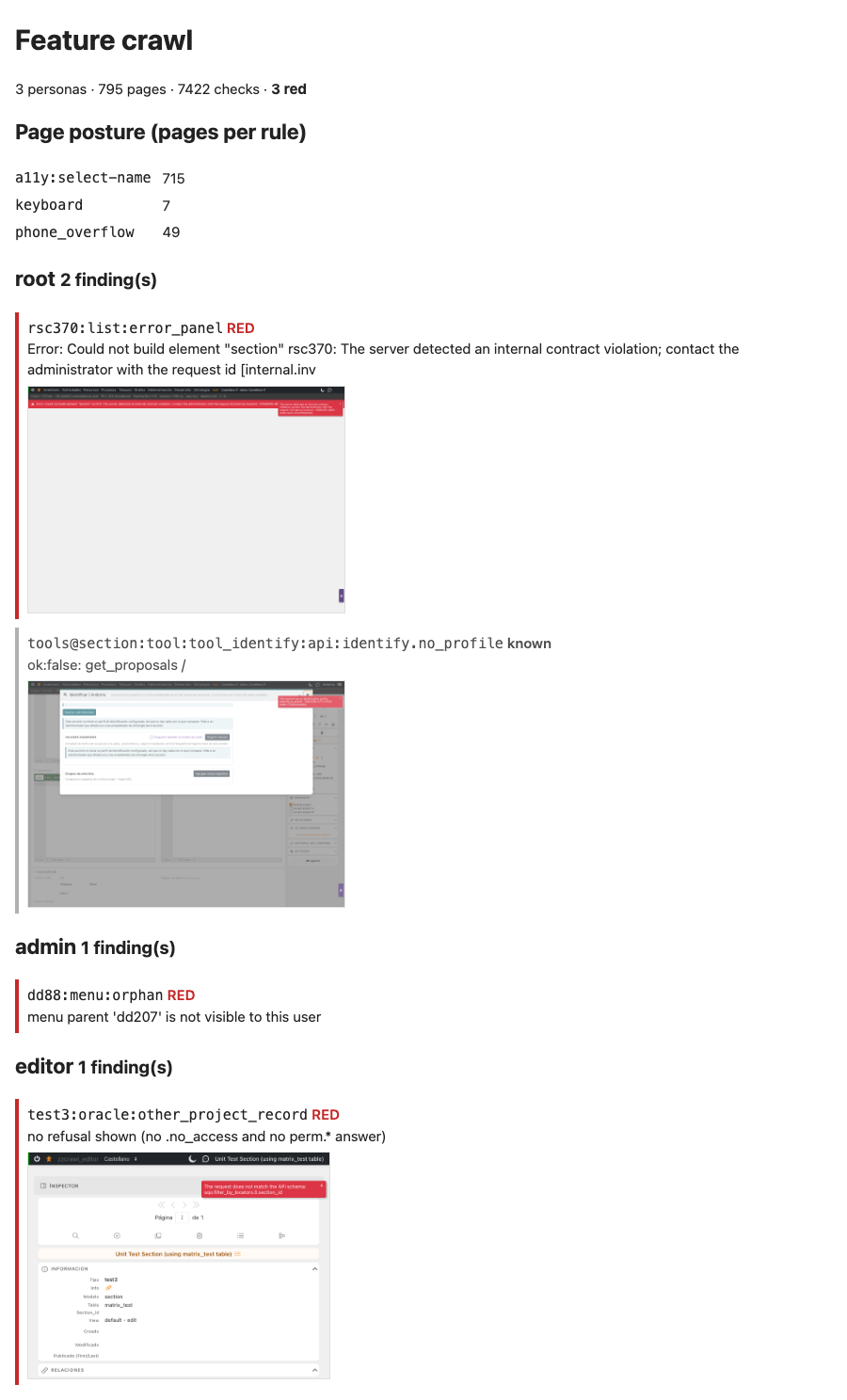
This image shows four findings from the 2026-10-27 run, re-rendered with the current report layout. The real page lists all of a run's findings.
Posture is budgeted per rule, not per page
Accessibility, keyboard and phone-width debt is too large to list page by page, so it is
counted: how many pages break each rule. The budget lives in
engineering/crawl_posture_budget.json. A rule over budget, or a new rule, is red.
pie showData title Pages over each posture rule (budget, ~790 pages)
    "a11y:select-name" : 715
    "a11y:aria-valid-attr" : 105
    "a11y:button-name" : 65
    "phone_overflow" : 49
    "a11y:image-alt" : 27
    "keyboard" : 7
A green full run with --update lowers each budget to what was observed and drops a
rule no page breaks any more. A budget only rises by a hand edit whose commit says why.
Coverage floors
A crawl that quietly stopped reaching a menu branch would still be green, so a full run
must also reach the floors in engineering/crawl_inventory.json (774 pages, 9,351
checks). --update raises them after a green full run, less a small slack (2 % pages,
3 % checks) because lazily rendered components make the check count drift between
identical runs.
Options
| Option | Effect |
|---|---|
--persona root,admin,editor |
Walk only these personas. |
--only <tipo,…> |
Visit only these sections. |
--max <n> |
Stop after n sections per persona. |
--journey a,b / --no-journeys |
Run only these journeys / none. |
--concurrency <n> |
Pages in parallel (default 4). |
--out <dir> |
Write the JSON + HTML report and screenshots. |
--headful |
Show the browser. |
--strict |
Ignore the ratchet. |
--update |
After a green full run, bank floors and budgets. |
A narrowed run (--only, --persona, --max, --journey, --no-journeys) never
checks or banks the floors.
Audit mode — a read-only report on staging
bun run test:crawl --audit --i-know-this-is-staging \
    --url https://staging.example.org --entity <name> --as admin,editor --out report/
Run on the staging host, from its checkout: it reads that install's own configuration. It walks real existing users and produces a report, with no ratchet.
Guards:
- The explicit
--i-know-this-is-stagingflag. /healthat--urlmust name--entity.- Every API request whose action is not a read is aborted in the browser and listed in the report, so no page can write, whatever it tries.
- Sessions are minted for the named users and destroyed at the end.
- No fixtures, no journeys, and tools that open a new window are not opened.
What it does not do
Know the limits before trusting a green run.
| Not covered | Why / where instead |
|---|---|
| Every record | Only the first visible record of each section is opened in edit. |
| Every component | One component per model per page, plus every component whose grant differs. |
| Visual regressions | Screenshots are taken only for findings; nothing compares pixels. |
| Speed | A page that loads in 59 s passes. Load time is not gated. |
| Full accessibility | Only axe violations of critical impact count; serious and lower are ignored. |
| Full keyboard use | The check only proves Tab reaches a control, not that tab order reaches every action. |
| Most tool operations | Every offered tool is opened; only 7 tools have their main action run (TOOL_OPERATED in test/helpers/tool_operation_cases.ts). The other 32 are listed with a reason in TOOL_OPERATION_PENDING. |
| 19 journeys | Written down but not built yet, each with a reason, in JOURNEYS_PENDING: search and sort, media upload, relations editing, thesaurus moves, concurrent edits, publishing, server-down handling, and more. |
| Hosted CI | It needs a browser and the suite database, so it runs locally or in the self-hosted tier (engineering/CI.md). |
| Running beside other suites | bun test, bun run test:client and the crawl share one lock; a second run is refused. |
The hermetic half of the contract is test/unit/feature_crawl_tripwire.test.ts: every
tools/tool_* directory is operated, pending with a reason, or grant-only; written and
pending journeys never overlap; every KNOWN_FAILING id is well-formed; and the editor
persona can never be an admin, so the oracle can never pass by comparing admin with admin.