Updating data
See also: The update run · Updating code · Updating ontology · Backup and restore
Data is the most important part of a Dédalo project. In Dédalo, data has an abstraction layer and depends on the ontology definition. Sometimes the abstraction layer changes, or the global definitions need to add or change data structures; in those cases the data must be updated. The database schema may also need updating, or the indexes adjusting. All these changes happen in the same update-data process.
A release that changes data declares a data step in install/update/catalog.json, and the
update run of that release executes it as its data phase, after the
code swap, with every SQL file and script of the step. A code update therefore needs no separate
data update.
The "Update data" panel (update_data_version widget,
src/core/update/engine.ts) reports the real state: current_version_in_db
comes straight from the shared matrix_updates table, and the pending
updates list comes from the release catalog shipped with the code
(install/update/catalog.json) — no 7.x release carries a data step yet, so
the panel shows no pending migration today. When a release does ship a 7.x
migration, pressing "Update data" runs it for real against this server's own
database. The panel is for an installation whose database is behind its code outside a run —
after a manual update, for example. A code update is refused
while the database is behind: the data update comes first.
Updating data is the most delicate update process. "Update data" is a destructive maintenance action: it refuses without the superuser, maintenance mode and a fresh, proven restorable database backup, and while an update run is in flight (precondition classes).
A data change crosses the data model: in a run, a failure after the data phase has started ends in NEEDS_DB_RESTORE, and a human restores the database backup together with the previous code. Not every release changes data — a code-only release has no data step.
When the data version moves
The data version is the version of the last release that changed data. It is not always the version of the code that is running:
- A data change (moving a tipo, changing a flat portal, anything that touches existing records) ships only in a minor or major release: a
datastep is alwaysincompatible, and the catalog refuses anincompatiblepatch. A patch release never changes data. - Between data changes, the code runs on the data of the last data-changing release. Every release in between is data-compatible with it, so a patch or a minor without data changes needs no data update.
- Some minors and majors have no data change at all. They write no row to
matrix_updates, and pressing "Update data" does nothing for them. - The "Update data" panel shows
current_version_in_dbas that last data-changing version. It can lag the installed code version; that gap is expected and is not an error.
Ontology changes that do not alter existing data (a label, a list of components shown to users) ship in any version of their minor, and they are covered by the ontology update, not by this process.
Coming from version 6
Version 6 wrote a data-version row for every release, even when the release had only maintenance steps. Version 7 writes a row only for a release that changes data. The current data version is therefore the latest row, and it does not follow every code version.
Updating tasks
-
Close access to the work system.
Before updating the data, it is mandatory to change the Dédalo status to maintenance. Follow this guide to change the Dédalo status and disable Dédalo access.
Inconsistencies
If the work system is in a normal state instead of maintenance status and users change data while the data-update process is running, data inconsistencies may arise.
-
Enter the maintenance panel.
Log in as root user and go to the Maintenance panel, located in:
System administration -> Maintenance
-
Make a backup of the database.
The update refuses without a fresh backup that is proven restorable. Follow this guide to create a backup of the database.
Corruption
The update process will change the database; any problem with the database, server, memory or disk can corrupt the database during the process. A backup is mandatory to prevent data loss.
-
Read what is pending.
The panel lists the data step that the installed code's catalog declares for the version the database stands on. Do not install newer code first: the code update refuses while the database is behind, and a newer release runs its own data phase inside its run.
-
Locate the "Update data" control panel.
If a migration is pending, the update data control panel shows the task that is required:
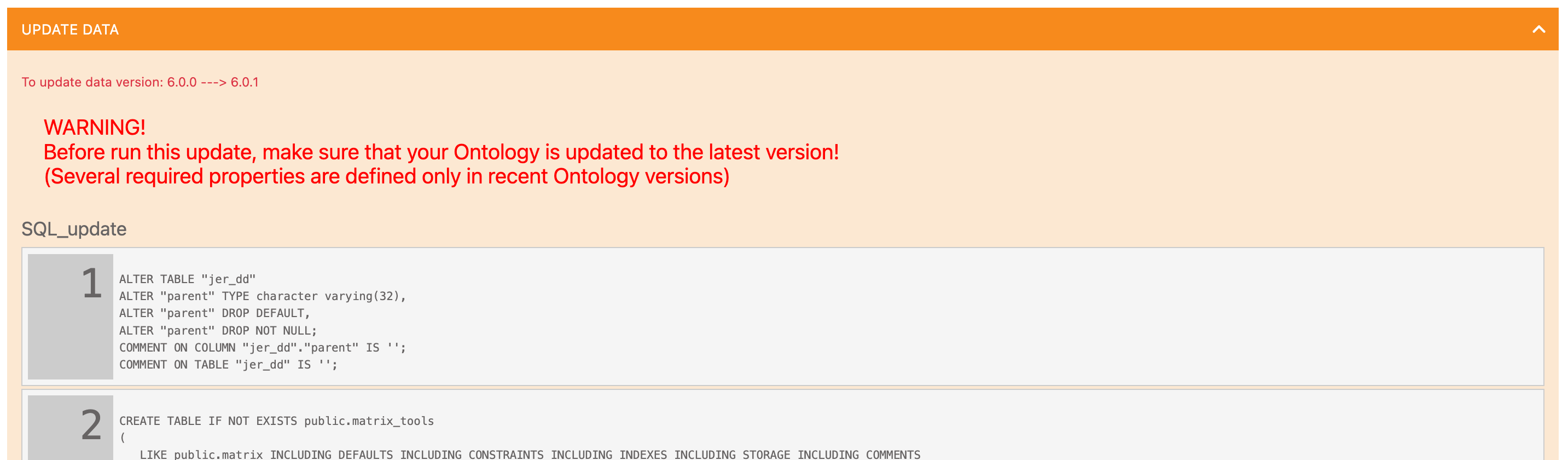
Read the list, and locate the last process:

When ready, press the "Update data" button, wait, and the result is shown when the process finishes.

-
Open access to the work system.
Revert the maintenance status to
false. -
Log out and re-login with a normal user.
Data updates could take time, especially in large installations.