Adding or installing new hierarchies
See also: Management and maintenance · Thesaurus dependencies
Hierarchies (thesauri) are an important part of the Dédalo system. Dédalo uses hierarchies in many scenarios: normalized toponymy, languages, themes, materials, techniques and more. Adding or installing new hierarchies is an important maintenance task.
Defining a hierarchy
Hierarchies are a complex data structure with several relation formats. As the name suggests, the data is structured hierarchically through parent-child relations; Dédalo also supports other relation types such as equality, change-to and equivalence.
By default all hierarchies sections are a clone of the hierarchy20 section. But is possible use any other section adding the relations and definition to create a hierarchy with any flat section.
Hierarchies are showed inside the Thesaurus area and they are viewed with a tree representation.
What is the difference between a hierarchy and a thesaurus?
A hierarchy is the structure of the data; the thesaurus is the data itself — the data entered by users or imported. Every thesaurus has a controlled definition in the Dédalo ontology (as an expansion of the ontology), and that definition is called a hierarchy.
In other words, hierarchies are the meta information of the thesaurus.
Creating new hierarchies
Is necessary to identify two different hierarchies types:
- Common and shared hierarchies
- Private hierarchies.
Common or shared hierarchies
Every hierarchy has a unique TLD that identify it and is used into Dédalo ontology as a specific section with his own configuration. To create or import a common or shared hierarchies you will need to know the TLD before open the new hierarchy.
In some hierarchies this TLD use a standard denomination, as toponymy hierarchies, that use the ISO 3166-1 definition to identify the countries.
Some common and shared TLD's: (list ordered by type and name)
| Hierarchy | Description | type | section | TLD |
|---|---|---|---|---|
| Chronological | Periods and time events | Thematic (1) | hierarchy20 | dc |
| Culture | Defines different cultures and his space and time | Thematic (1) | hierarchy20 | culture |
| Deposition type | Defines the different Deposition types of donations in register | Thematic (1) | hierarchy20 | depositiontype |
| Iconography | Defines iconography | Thematic (1) | hierarchy20 | icon |
| Immovable | Defines places as archeological sites, findspots | Thematic (1) | hierarchy20 | tchi |
| Inscriptions and measures | Defines typologies of inscriptions and his ubication into the object | Thematic (1) | hierarchy20 | pieces |
| Material | Defines the composition materials used in objects | Thematic (1) | hierarchy20 | material |
| Object name | Defines the different names for objects | Thematic (1) | hierarchy20 | object |
| Onomastic | Names of people and places | Thematic (1) | hierarchy20 | on |
| Technique | Defines the techniques used to build objects | Thematic (1) | hierarchy20 | technique |
| Thematic | Themes used to analyze heritage | Thematic (1) | hierarchy20 | ts |
| ISAD(g) | Defines the hierarchy related to the ISAD(g) | Catalog (8) | isad1 | isad |
| Languages | Languages families and dialects | languages (3) | hierarchy20 | lg |
| Cause of uncertainty | Defines the reasons of the uncertainty | Semantic (4) | hierarchy20 | uncertainty |
| Position role | Defines the different position role for persons | Semantic (4) | hierarchy20 | rolepos |
| Semantic | Defines context for data, relations between concepts | Semantic (4) | hierarchy20 | ds |
| Users jobs | Defines the different jobs for people | Semantic (4) | hierarchy20 | rolejob |
| Users roles | Defines the different roles of Dédalo users | Semantic (4) | hierarchy20 | roleusr |
| Special | Defines a restrictions for indexation | Special (5) | hierarchy20 | special |
| Analysis | Defines the different analysis techniques applied to objects. | Restoration (10) | hierarchy20 | resanalysis |
| Cause | Defines the reasons of the affectation | Restoration (10) | hierarchy20 | rescause |
| Countermark | Defines symbols used as countermarks | Epigraphy (7) | hierarchy20 | sccmk |
| Greek | Defines especial symbols not defined into Unicode | Epigraphy (7) | hierarchy20 | scell |
| Job material | Defines the work materials to be used in the restoration process | Restoration (10) | hierarchy20 | resmaterial |
| Latin | Defines especial symbols not defined into Unicode | Epigraphy (7) | hierarchy20 | sclat |
| Northern Paleo Hispanic | Defines Iberian symbols not defined into Unicode | Epigraphy (7) | hierarchy20 | scxibo |
| Pathology | Defines the affectations in the objects | Restoration (10) | hierarchy20 | respathology |
| Punic | Defines especial symbols not defined into Unicode | Epigraphy (7) | hierarchy20 | scxpu |
| South-Western Paleo Hispanic | Defines Iberian symbols not defined into Unicode | Epigraphy (7) | hierarchy20 | sctxr |
| Southern Paleo Hispanic | Defines Iberian symbols not defined into Unicode | Epigraphy (7) | hierarchy20 | scxibm |
| Symbols | Defines symbols | Epigraphy (7) | hierarchy20 | scsym |
| Treatment | Defines the processes that can be applied into the restoration process | Restoration (10) | hierarchy20 | restreatment |
| Web sites | Website structure, menus, etc | Websites (6) | ww10 | ww |
| Ubication | Topographic, to identify the location of objects | Ubications (9) | hierarchy20 | ubication |
Languages is already there
The Languages hierarchy (lg) is active on every installation: its terms ship with the installation database and the installer activates it. There is nothing to create, import or reset for it.
TLD's names
The first hierarchies created were toponyms, and this hierarchies followed the ISO TLD's Alpha 2 to use as Dédalo ontology TLD. Some of the first common hierarchies follow the ISO Alpha 2 rule, as thematic hierarchy, that use ts as TLD, by the time, it became impossible to create new ontologies following the Alpha 2 rule, so, the Alpha2 rule was removed and now Dédalo can use a longs TLD's, but following some rules: For this historical reasons no spaces, especial characters, numbers, points, commas or any other characters outside ASCII characters are valid (as accents á, è, ç, ñ, etc.). To create hierarchies TLD's, only [a-z] characters are accepted.
Private hierarchies
Is possible to create hierarchies by your own, alone for other Dédalo installations. In this case you will need to use a specific TLD following the rule of use only letters, without spaces, numbers or any special characters.
Usually, the hierarchy reference will be hierarchy20, the normalized section used as thesaurus model.
Process to create new hierarchy
Both, common and private, hierarchies has the same process to be created.
-
Go to Hierarchy section in the Thesaurus menu.

-
Review if the TLD exists previously doing a search.

-
If not exists, create new record as any other section.
- Mandatory Add the new TLD into the TLD (Alpha2) field.
- Add the main language of the hierarchy
- Mandatory Set the Typology of the new hierarchy
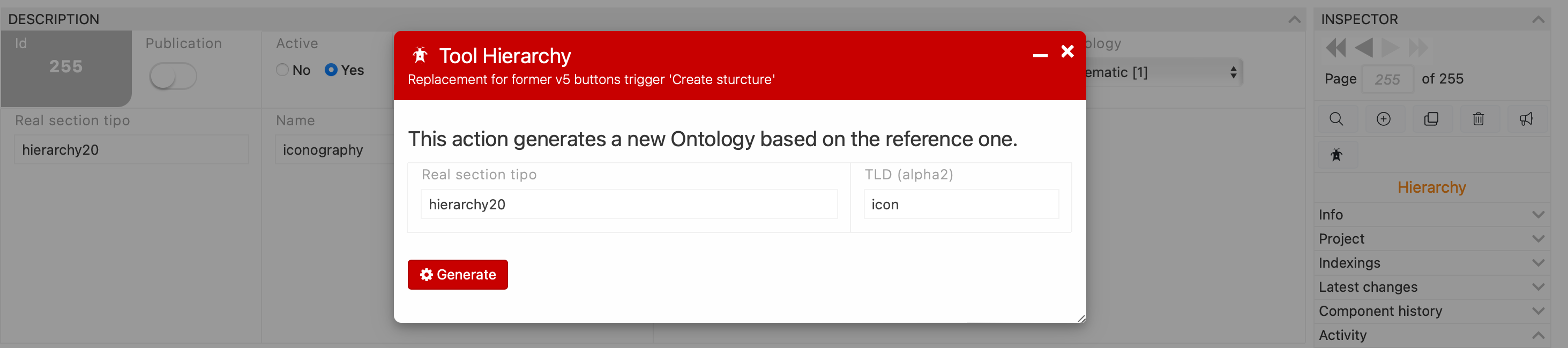
- Mandatory Set the real section tipo (usually hierarchy20)
- Mandatory Add the name of the hierarchy
-
You do not need to set "Active" yourself — the tool does it. (Setting it to "Yes" first is harmless.)

-
Open the tool to create the new hierarchy, the tool is locate into the inspector.

-
Read the status panel, then press Activate / repair.
The panel lists the ten conditions a usable hierarchy must meet and marks each ✓ or ✗, so you can see what is missing before you press anything — and afterwards, exactly what changed.
How this works
The button is
tool_hierarchy'sgenerate_virtual_sectionaction (tools/tool_hierarchy/server/tool_hierarchy.ts), which converges the record to that invariant viaensureHierarchy()insrc/core/ontology/hierarchy_state.ts: it provisions the<tld>1/<tld>2virtual sections and theirdd_ontologynodes, flags the hierarchy active, and roots the tree at a general term named after the hierarchy. The write gate (section permission ≥ 2) is enforced the same way as any other write. It also grants your own profile level2over the two new sections and everything inside them, so the hierarchy is usable immediately; other users still need their permissions set in step 12.The action is idempotent and non-destructive: it creates only what is missing. Pressing it on a healthy hierarchy reports "Already consistent — nothing to do", so it is also the way to repair a hierarchy that is half-built — read the panel for the reason. The Rebuild the ontology checkbox is the destructive variant: it deletes the TLD's ontology and re-creates it, and your thesaurus terms are kept.
-
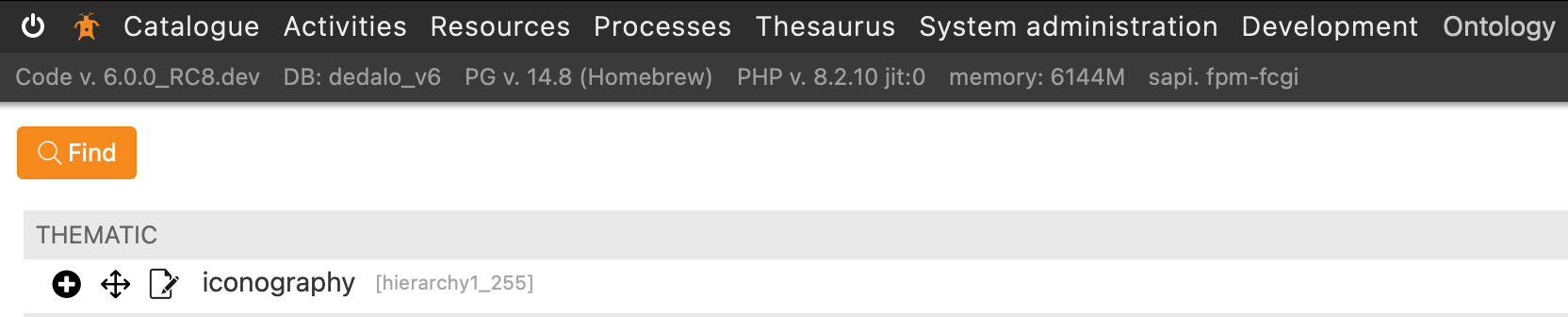
Check in Thesaurus that this hierarchy is ready and set the permissions to users as you need.
Toponyms or other standardized hierarchies
Dédalo ships around 150 standardized hierarchies — the ISO country toponymies and
the common thematic ones — in install/import/hierarchy/: one manifest,
hierarchy.json, that lists every hierarchy the release offers, and the dump
files of their terms. You do not create these by hand:
- During the install, the installer asks: its Thesauri screen as a
checkbox list, or
--hierarchies <codes>|default|noneon the command line (command-line flags). Both offer every entry ofhierarchy.jsonand pre-select only the thesauri an installed ontology declares as a dependency, mandatory or optional — all pre-ticked, and you can untick any of them. A mandatory one is marked strongly recommended; leaving it out never stops the install, it only gives a warning that you can install it later from Maintenance → Install hierarchies (dependencies). Nothing else is pre-selected — no country's toponymy either. The installer suggests importing your own country's toponymy (for example Nepal,np, for an installation in Nepal); that is advice, never a default.noneis a valid answer. The Languages thesaurus (lg) is not a choice: it is active on every install, and naming it is dropped with a note. - Afterwards, Maintenance → Install hierarchies (
add_hierarchy) offers the same list, marking the ones already installed, and imports on demand.
Either way the import is the same operation. First, the entry must fit this
installation: its language must already exist in the Languages thesaurus, its
typology must be a record here, and a real section it names must be a section
here. Otherwise the hierarchy is refused and nothing is written. Then every data
file the entry lists is checked against its sha256 (a missing or changed file
refuses that hierarchy, with nothing written). Then the terms are copied into
matrix_hierarchy, the record counter is re-consolidated, and the hierarchy is
activated. A hierarchy listed without data files is activated as an
empty thesaurus, ready for your editors. The first activation writes the
hierarchy's registry record from its manifest entry — name, typology, default
language, real section, scope note and dependencies. Activation is not optional — imported terms with no ontology and no
active registry record are unreachable, so an import whose activation fails is
reported as a failure for that TLD, not as a partial success.
A thesaurus's own dependencies are suggested with it: if its entry declares
other thesauri, ticking it ticks them too, and a mandatory one is marked
strongly recommended. You can untick any of them. A thesaurus dependency
never stops an import: what you leave out, or what has no entry in
hierarchy.json, is installed without it, and the result warns that it is
strongly recommended and can be installed later from this same panel. You may
also keep a thesaurus of your own under another name instead. Only a declared
mandatory ontology that this installation does not have stops the import:
nothing is installed, and the reason is reported.
A hierarchy whose terms are already present is not copied again, never merged: the import is additive. It is still activated, so a run that was interrupted after the import is finished by the next one. To replace one with the shipped version, use the panel's reset action — it deletes that TLD's rows first, so anything your editors added to it is lost. The same applies when a hierarchy was installed empty and a later release ships its terms: the install refuses it and tells you to use reset, because the only row it holds is the root created when it was activated.
Moving a hierarchy between installations
The vendored set is not the only source. A hierarchy curated in one install — a private thesaurus, or a shared one you have extended — travels to another install as the same kind of dump file, produced by the Maintenance area's Export hierarchy panel.
The two halves meet in one directory: install/import/hierarchy/, inside the
engine's own tree. Export writes there; import reads from there. There is no path
to configure — the destination is derived from the engine's location, so a file
exported on a machine is immediately offered by that machine's own import panel.
Nothing you put in install/import/hierarchy/ survives a code update
The directory is part of the code tree. A code update
from the panel moves the whole tree aside, files you added and your edits to
hierarchy.json included, and the new release brings its own
hierarchy.json. A git pull stops on the edited hierarchy.json as a
conflict. Import the hierarchies you carried over before updating the
code, or copy the files and the manifest entries in again afterwards. The
exports you need to keep belong in your own archive, not in this directory.
Coming from v6
v6 had an EXPORT_HIERARCHY_PATH constant for this destination. It is gone,
and the config migration drops it: the only
useful destination is the directory the import half already reads.
1. Export, on the source install
Maintenance → Export hierarchy. The panel has two exports, run in this order.
Data files. List the section tipos to dump, comma-separated, for example
es1,fr1. Each one must be the thesaurus section (hierarchy53) or the model
section (hierarchy58) of an active hierarchy, and it must be that
hierarchy's own <tld>1 or <tld>2: hierarchy.json lists no other data file. Each accepted tipo produces
one <section_tipo>.copy.gz: a gzip-compressed psql COPY of that section's
rows in matrix_hierarchy. Anything else gets its own error line and nothing is
written for it. That includes a tipo of an inactive hierarchy, an unknown tipo,
and the old * (every active hierarchy) and all (the whole table) forms, which
are no longer accepted. The panel lists the files it produced, with a download
link for each (/dedalo/install/import/hierarchy/<file>), and prints the manual
re-import command underneath.
Languages (lg) are never exported
lg1 and lg2 are refused. The language thesaurus is a core hierarchy:
its terms live in matrix_langs and ship in the install seed
(install/db/seed/matrix_langs.copy.gz). Every installation already has
them, and importing them into matrix_hierarchy would only add noise.
hierarchy.json. The Export hierarchy.json button writes
install/import/hierarchy/hierarchy.json. That is the manifest the installer
reads. It lists every active hierarchy with its name, typology, language, real
section, scope note and declared dependencies. For each one it also lists the
data files present in the directory at that moment, with the sha256 of
their bytes. Run it after the data export. A data file written later is not
covered by the manifest's checksums, and the installer refuses a file whose
checksum does not match. An active hierarchy with no data file is listed with
data_files: []: it is installed as an empty thesaurus. The panel names these
hierarchies under the result. If a registry row cannot be described (no valid
TLD, no typology, no integer language id, a real section that is not a section,
or a stored value the format does not accept, such as a language code in
capitals), it is left out and named in the panel's error lines. The file is still
written for every other hierarchy.
2. Carry the files across
Copy the data files into the target install's install/import/hierarchy/
directory, as the service user. A hierarchy is at most two files, and may have
none (an empty thesaurus):
| File | Holds |
|---|---|
<tld>1.copy.gz |
the thesaurus terms |
<tld>2.copy.gz |
the hierarchy's models, when it has them |
3. List it in the target's hierarchy.json, or the panel will not offer it
The import panel offers exactly the entries of the target's
install/import/hierarchy/hierarchy.json. A .copy.gz that no entry lists is
never offered. Take each hierarchy's entry from the source's exported
hierarchy.json — the whole object from active_hierarchies, with its
data_files checksums unchanged — and add it to the target's
active_hierarchies. If its typology_id is not yet in the target's
typologies, copy that typology too. Do not retype an entry: the checksums are
what proves the files you carried are the ones that were exported.
To move a whole installation's set, copy the source's hierarchy.json over the
target's instead: it then offers exactly the source's active hierarchies.
A malformed hierarchy.json stops the installer and the panel
The manifest is read strictly. A missing required field, a wrong type, a
duplicated TLD, a typology that is not listed or a data file that is not the
entry's own refuses the whole file (install.manifest_invalid), and the
error names the place in the file. Nothing is offered until it is fixed —
never a silently shorter list.
4. Import and activate, on the target install
Maintenance → Install hierarchies, tick the TLD, import. This is the same code
path as the vendored hierarchies: copy into matrix_hierarchy, re-consolidate the
counter, activate. The TLD then appears in the Thesaurus area.
Two things the import does not do for you:
- Permissions. Grant the profiles that need it access to the new sections, as in step 12 above.
- Ontology dependencies. A hierarchy whose terms are referenced by components of another TLD needs that ontology present too. See thesaurus dependencies.
Verify the round trip
- [ ] The file is listed by the panel on the source install, and downloads.
- [ ] On the target, the TLD appears in the Install hierarchies list.
- [ ] After import, the Thesaurus area shows the tree with its terms.
- [ ] A portal or autocomplete pointing at that hierarchy resolves terms.
Ids are carried, not re-assigned
The dump preserves section_id. Importing into a TLD that already holds terms
is refused as already installed rather than merged, precisely because the two
id spaces would collide. Merging two populated copies of the same hierarchy is
not what this tool does — export from one, import into an install that does not
have it.